

AI in sales and marketing sounds like it should fix everything, right up until you try a few tools and end up with generic copy, noisy dashboards, and one more tab open at 5:42 p.m. Here’s the thing: AI is genuinely useful, but only in specific places. It works best when it speeds up repetitive work, sharpens decisions, and supports human conversations instead of pretending to replace them.
If you run a lean B2B SaaS team, that distinction matters. AI in sales and marketing is simply the use of software to generate drafts, spot patterns, and automate routine steps across your go-to-market work. The value is not “autonomous growth.” The value is getting better output from the same team, with less drag.
What you’ll learn in this guide:
- Where AI actually saves time
- The strongest marketing use cases
- The strongest sales use cases
- How AI helps across the funnel
- Where teams usually get burned
- How to choose tools without tool sprawl
- A practical 30-day rollout plan
- Which metrics show real impact
Where AI in Sales and Marketing Actually Helps
Most advice on AI mixes two very different things: practical assistance and shiny demos. That’s why so many teams end up disappointed. A tool writes ten LinkedIn posts in thirty seconds, but none sound like your company. A sales assistant promises smarter pipeline management, but your CRM is messy enough to make any recommendation questionable.
The direct claim is simple: AI earns its keep when it helps your team move faster through work that is repeated often, based on data you already have, and still reviewed by a person before it reaches a buyer. That includes things like summarizing calls, drafting follow-ups, scoring leads, building content briefs, repurposing webinars, surfacing deal risk, and keeping records cleaner.
The opposite is also true. If you expect AI to invent strategy, understand nuanced buyer politics, or produce polished messaging with no editing, you will waste time.
Start Here: What “AI in Sales and Marketing” Really Means
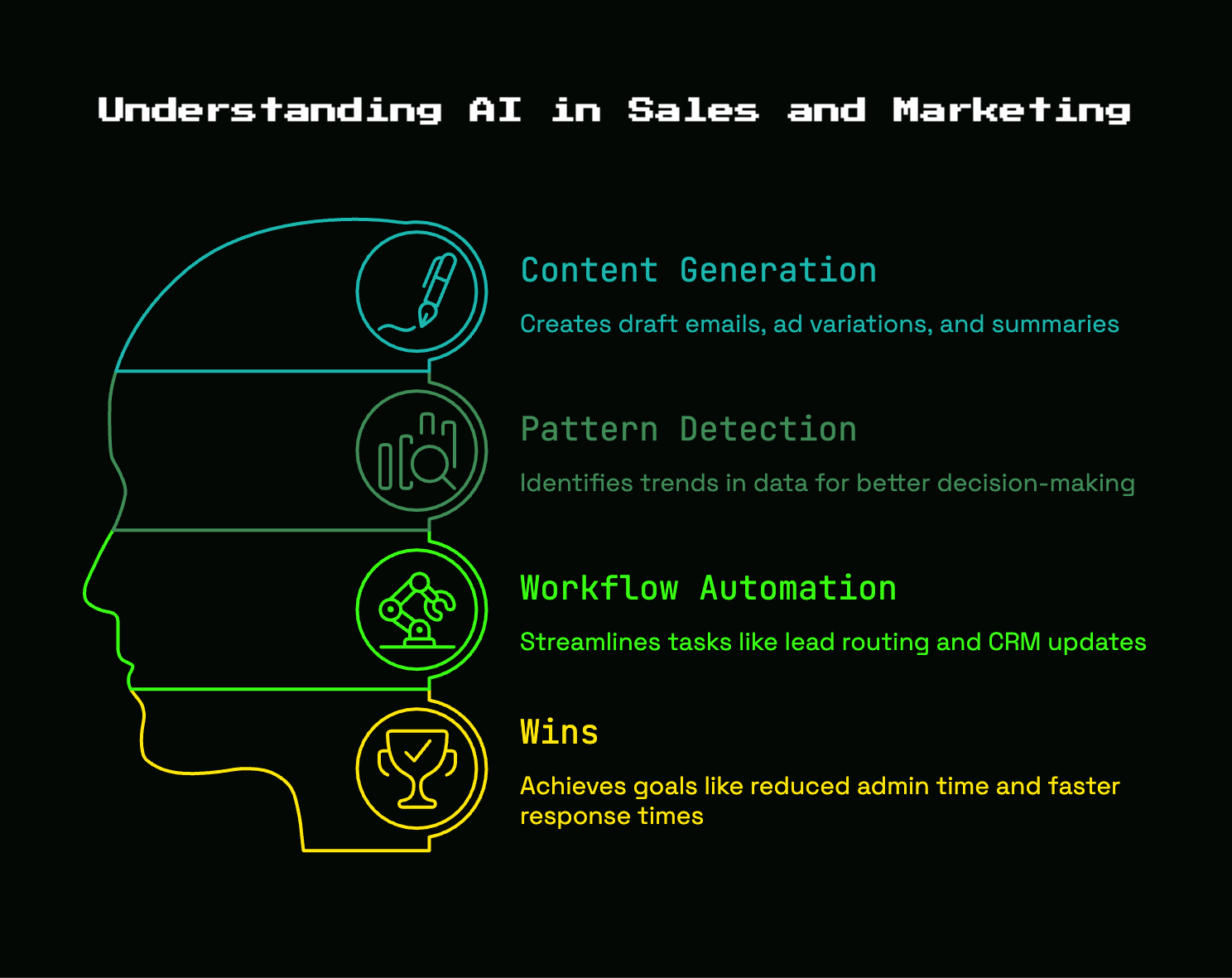
For a busy SaaS team, “AI” does not need to mean anything mystical. It usually means one of three things: a system that generates text or media, a system that finds patterns in data, or a system that automates steps inside a workflow. That’s it. Once you separate those buckets, the topic gets a lot less fuzzy.
A lot of confusion happens because old-school automation and newer generative tools get thrown together. Sending an auto-reply after a form fill is automation. Predicting which leads are more likely to book a demo is pattern recognition. Drafting an outbound email from account data is generative AI. Useful, but different.
The 3 Buckets That Matter Most
The first bucket is content generation. This covers things like draft emails, ad variations, webinar summaries, article outlines, and call recap emails. It is great for getting to version one faster. It is not great at producing your final version without supervision.
The second bucket is pattern detection. This is where AI reviews large amounts of data and notices things you would miss manually, like which lead sources convert better, which accounts show buying intent, or which deals tend to stall after security review. According to Gartner, sales organizations using AI-enabled next best actions are 2.6 times more likely to achieve commercial growth. That’s not because the model is magic. It’s because good prompts plus good signals can help your team act sooner.
The third bucket is workflow automation. Think lead routing, CRM updates, follow-up reminders, meeting note syncing, or ad reporting summaries. This category is less flashy and often more valuable, especially when your team is still small.
What Counts as a Win
For an early-stage B2B SaaS team, a win is not “using AI everywhere.” A win is fewer hours lost to admin, faster response times, better prioritization, and more consistent execution.
That usually shows up as more qualified meetings, quicker follow-up after demos, cleaner CRM fields, better campaign output from the same headcount, and less founder time spent cobbling together notes from five different tools. If your first sales rep can spend another five hours a week talking to real prospects because notes and prep got lighter, that’s a meaningful gain.
The Best AI Use Cases in Marketing
Marketing is where teams often overreach. The temptation is to automate output at scale, but the better use of AI is usually support work: research, drafting, repurposing, testing, and prioritization. That is where lean teams feel the benefit quickly.
Content Research, Briefs, and First Drafts
AI is very good at helping you start. If you need a comparison-page outline, a list of objections to cover in an article, ten headline options for a landing page, or a rough ad angle for a new feature, AI can get you past the blank page fast.
That matters more than it sounds. A founder staring at an empty doc on a Tuesday morning often loses an hour just deciding how to frame the piece. AI can turn that into ten minutes. But the catch is simple: version one is not version done. Publishing untouched AI copy usually gives you flat, interchangeable content that sounds like every other SaaS company in your category.
Repurposing One Good Idea Into Many Assets
This is one of the strongest use cases in all of marketing. One customer webinar can become a nurture email, three LinkedIn posts, sales talking points, FAQs for the website, ad angles, and a short landing page section. AI helps you unpack one useful source into multiple formats without rebuilding from scratch every time.
That is especially helpful if your best ideas are trapped in calls, demos, and founder posts. You already have the raw material. AI just helps sort, rewrite, and reformat it. A thirty-minute product walkthrough recorded on a rainy Thursday can turn into a week of useful assets if the system is set up well.
Segmentation and Personalization That Goes Beyond “Hi First Name”
Real personalization is about relevance. It is not about dropping a name into a subject line and pretending the message is tailored.
AI can help group accounts by industry, company size, product usage, site behavior, or buying stage, then suggest different messaging for each segment. Maybe healthcare prospects care more about compliance, while agency buyers care more about client reporting. Maybe users who hit a pricing page twice need a different follow-up than users who only read a top-of-funnel article.
That kind of adjustment works because it reflects actual context. It feels less like surveillance and more like competence.
Paid Campaign Support and Creative Testing
Paid acquisition gets expensive fast, which makes speed of learning more valuable than volume of output. AI helps generate copy variations, expand keyword ideas, cluster search themes, summarize search term reports, and identify which messages keep repeating across winning ads.
But budget and positioning still need your judgment. If the tool suggests twenty ad variants built around the wrong angle, testing faster only gets you to the wrong answer sooner. Paid AI is best used as a fast assistant, not the campaign strategist.
The Best AI Use Cases in Sales
On the sales side, the biggest wins tend to be easier to measure. Admin gets lighter. Prep gets faster. Follow-up gets more consistent. Pipeline review gets clearer. Those are real gains when every deal matters.
Prospect Research and Account Prep
Before outreach or a discovery call, AI can pull together company background, recent funding, hiring patterns, product signals, likely pain points, and role-specific talking points. Instead of bouncing between LinkedIn, the company site, news results, and old notes, you get a working brief in one place.
That does not mean every brief will be brilliant. But it usually gets you 70 percent of the way there, which is enough to make your prep more focused and your questions better.
Lead Qualification and Prioritization
If every demo request looks equally urgent, your rep ends up treating all leads the same. That is a fast path to wasted time. AI can help score leads based on fit, enrichment, behavior, and source quality, then route attention toward accounts more likely to turn into pipeline.
This is one area where tool choice matters a lot. If you are comparing platforms, it helps to look at how different options handle scoring, workflows, and rep adoption rather than chasing whichever product has the loudest launch thread.
Outreach That Sounds Human
AI-assisted outreach can be useful. AI-generated spam is not.
The good version looks like this: you feed the system account context, pain-point framing, a real point of view, and examples of your tone. It drafts a message that still needs editing, but gets the structure right and saves time on repetitive parts. The bad version scrapes a podcast appearance, mentions it awkwardly in line one, and sends the same fake-personalized email to 500 people.
Prospects can tell. Honestly, most can tell in five seconds.
Call Notes, Summaries, and Next Steps
This is one of the clearest wins available. AI can summarize calls, capture objections, assign action items, draft recap emails, and push notes into the CRM. For a small team, that means less manual logging and fewer forgotten next steps.
It also improves continuity. If someone else joins the deal later, the context is easier to pick up. No more digging through scattered notes and trying to remember what happened in a Tuesday demo two weeks ago.
Pipeline Review, Forecasting, and Deal Risk
Forecast calls get weird when everybody is relying on optimism and memory. AI can flag stale deals, missing stakeholders, weak multi-threading, long gaps between touches, and opportunities with suspiciously little activity for their stage.
That makes pipeline review more grounded. Not perfect, just less fuzzy. If a founder needs quick visibility into what is actually moving, this kind of signal is far more useful than another vanity dashboard.
Sales Coaching Without a Full Enablement Team
Early reps rarely get much structured coaching. AI can help by reviewing calls, spotting patterns in wins and losses, surfacing objection trends, and even running roleplay scenarios before a tough conversation.
Used well, this creates a lightweight coaching system without hiring a full enablement function. Used badly, it turns into a pile of “improvement suggestions” nobody trusts. The trick is to focus on a few repeatable moments, like discovery questions, pricing conversations, or next-step framing.
Where AI Helps Most Across the Full Funnel
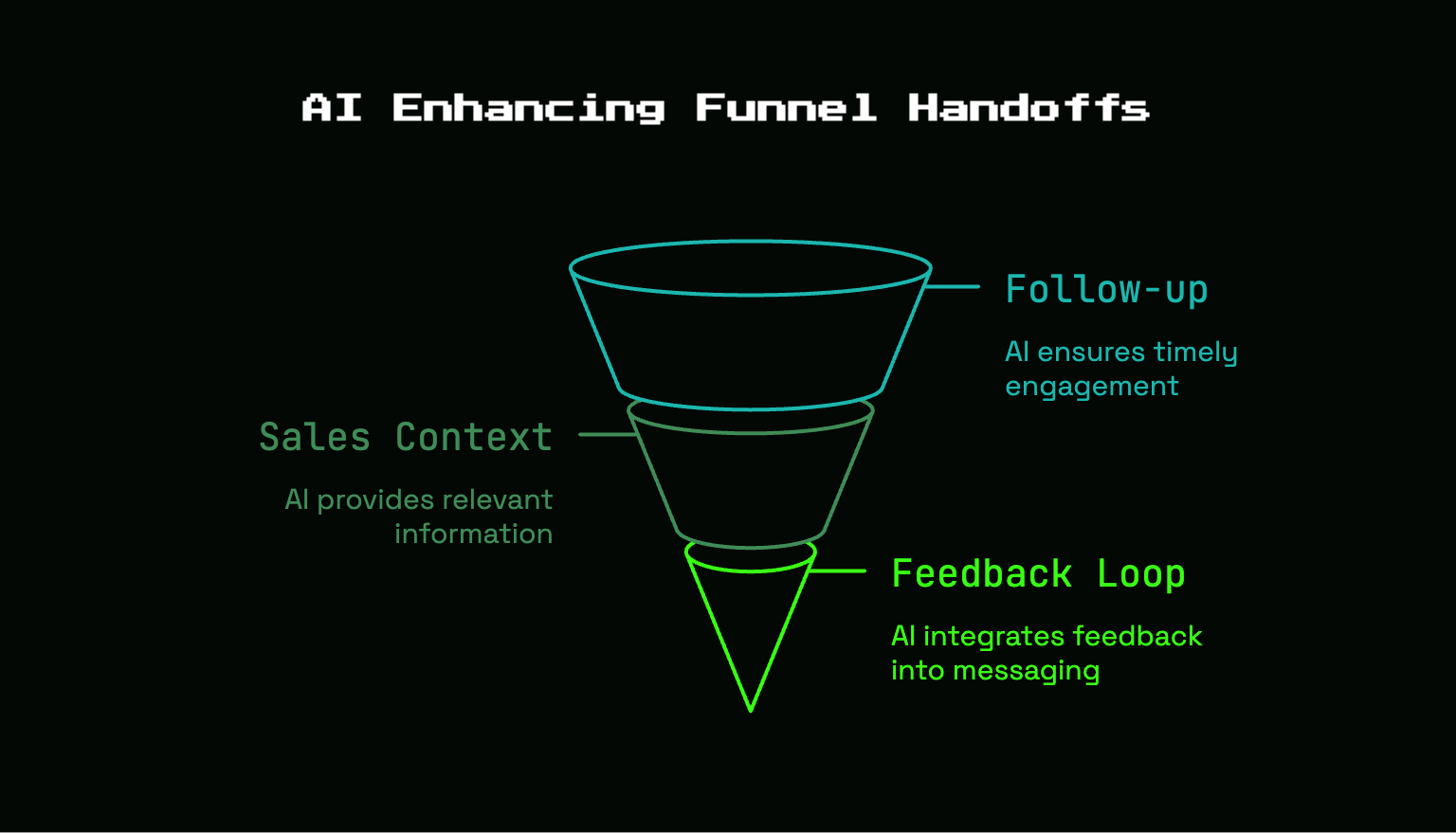
The most overlooked value often sits between teams. AI is useful at handoff points because that’s where small companies leak momentum: inquiry to follow-up, marketing engagement to sales context, closed-lost feedback back into messaging.
Top of Funnel: Finding Demand Earlier
AI can scan search patterns, site behavior, sales questions, support themes, and win-loss notes to spot what buyers keep asking before it becomes obvious in standard reporting. That helps you notice demand earlier and create content or campaigns around it sooner.
This matters because buyers often reveal intent in messy ways first. A repeated question in demos can be just as valuable as a keyword report.
Middle of Funnel: Better Nurture and Faster Follow-Up
Middle-funnel work tends to fail through delay, not drama. Someone attends a webinar, downloads a guide, asks a thoughtful question, then hears nothing for four days. Interest cools.
AI helps by drafting follow-ups, matching the right case study to the right segment, routing chat conversations, and reminding your team when live interest is going cold. If your nurture is currently half-built and mostly manual, this can tighten the whole system fast.
Bottom of Funnel: Sharper Buyer Conversations
Late-stage deals live or die on clarity. AI can help draft recap emails, summarize security concerns, turn technical product details into cleaner explanations, and structure mutual action plans that keep momentum visible.
That matters because complex products often lose deals through confusion, not competition. If your explanation gets cleaner, your sales process gets stronger.
Post-Sale: Expansion, Retention, and Feedback Loops
Post-sale is where a lot of AI content stops, which is a mistake. You can use AI to detect churn signals, identify expansion timing, summarize recurring support issues, and feed customer language back into sales and marketing messaging.
This is one of the best ways to keep your message honest. If customers keep describing your product in a specific way, your positioning should probably reflect that instead of clinging to internal jargon.
Where AI Usually Disappoints
AI is not failing because the technology is useless. It usually fails because the workflow is lazy, the data is bad, or the goal was unrealistic.
Fully Automated Content at Scale
If you use AI to publish blog posts, nurture emails, and landing pages without editing, your voice flattens fast. The writing becomes polished in the same way hotel art is polished. Clean, generic, forgettable.
Search engines and buyers both notice sameness eventually. So do your conversion rates.
Fake Personalization in Outbound
A lot of outbound “personalization” is just AI adding shallow references at scale. Mentioning a prospect’s latest post or funding round means nothing if the message underneath is still generic.
In many cases, this hurts more than sending a simple, direct email. Bad personalization feels like a stranger reading your mail over your shoulder and still getting the point wrong.
Messy CRM Data In, Bad AI Out
Broken stages, missing notes, duplicate contacts, stale account data, vague close dates, all of that poisons the output. AI does not fix weak inputs by itself. It amplifies them.
That is why teams get nonsense forecasts and irrelevant recommendations. If the record says a deal is active but nobody has replied in 28 days, the system can only be as smart as the truth you gave it.
Replacing Judgment in Complex Deals
AI cannot build trust for you. It cannot read tension in a buying committee, notice when a champion is losing influence, or decide when to push and when to back off. It can support those moments with prep and context. It cannot own them.
That line matters more in B2B SaaS than almost anywhere else.
What Makes AI Work in a $1M, $5M ARR SaaS Team
At your stage, the goal is not transformation theater. The goal is practical leverage without adding chaos.
Pick One Bottleneck, Not Ten Tools
Start with the most annoying repeated task in your workflow. Maybe it is call notes. Maybe it is founder-written follow-up emails. Maybe it is content repurposing. Maybe it is lead triage. Pick one.
Narrow use cases win because adoption is easier, output is easier to judge, and time saved is easier to measure.
Keep Humans on the Sharp Edges
A simple rule works well: let AI prep, summarize, sort, and draft. Let people handle positioning, objections, relationship moments, approvals, and final calls.
That keeps the machine in the support role where it is strongest. It also protects quality where the stakes are highest.
Build Around the Stack You Already Use
Before buying something new, check the AI features already sitting inside your CRM, ad platform, email system, or call recording software. Those often solve 80 percent of the problem with less setup.
The hidden benefit is workflow fit. If the output lands where your team already works, adoption goes up.
A Simple Framework for Choosing AI Tools
Most AI buying mistakes look obvious in hindsight. The tool looked impressive, the demo was smooth, but the actual job-to-be-done was fuzzy.
Ask These Questions Before You Buy
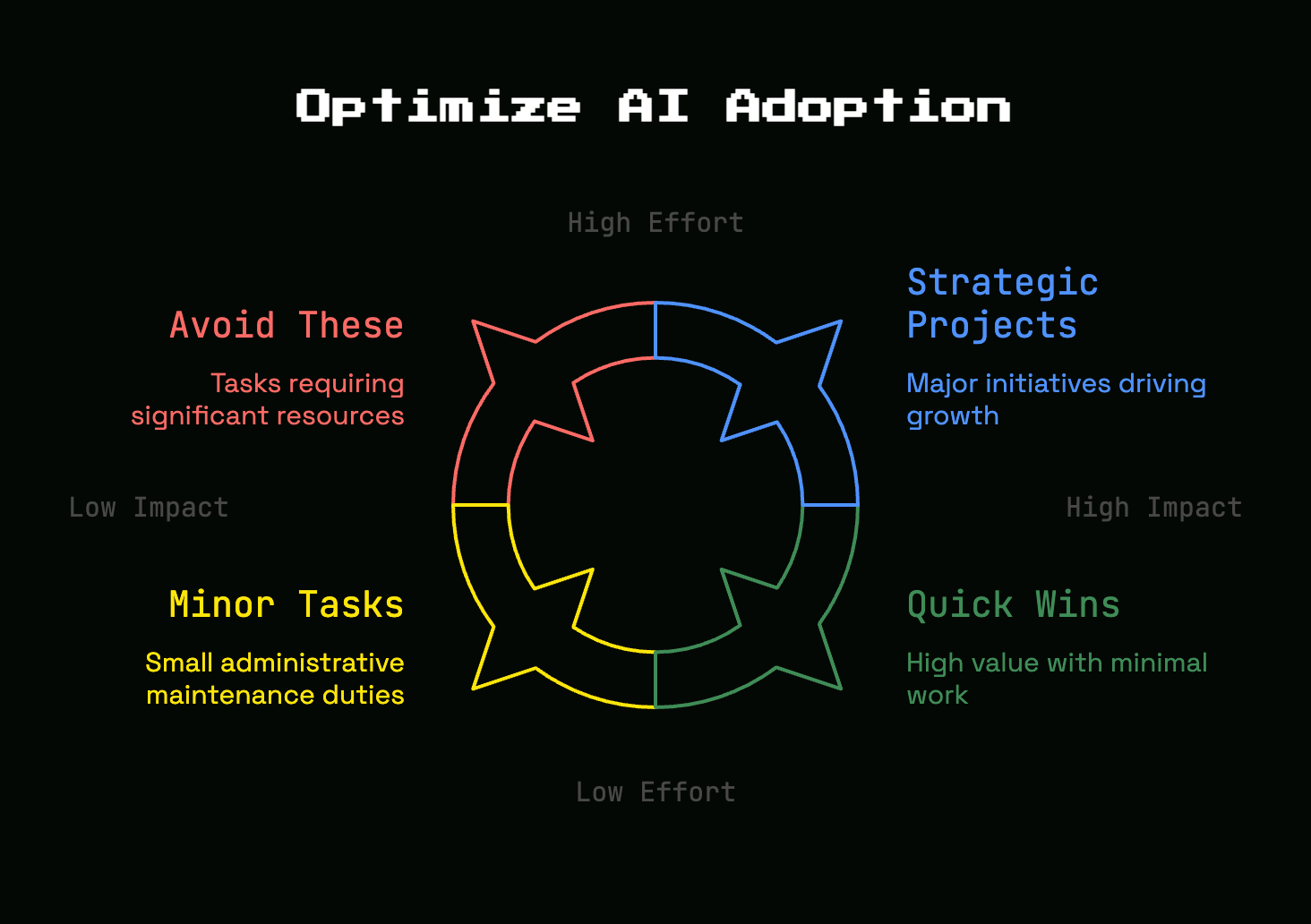
What task does the tool save time on? How often does that task happen? Is the output trustworthy enough to use with light review? Does it fit your existing workflow, or does it create another place to check?
Those filters eliminate a lot of shiny objects quickly. If a problem only happens twice a month, automating it may not matter.
Evaluate Output Quality in Real Work
Use live examples, not sandbox demos. Test the tool on real call recordings, actual campaign briefs, current target accounts, and your own messaging. Demos are like showroom lighting. Everything looks better there.
If the output still holds up in messy everyday use, then you have something.
Check the Hidden Costs
Cheap tools can get expensive in softer ways: onboarding time, prompt tuning, approval steps, workflow changes, cleanup work, and ongoing editing. A tool that saves twenty minutes but adds fifteen minutes of checking is not doing much.
That is why practical buyers look at operating cost, not just subscription cost.
A Practical Rollout Plan for the Next 30 Days
You do not need a massive AI initiative. You need a small test with a clear owner and a visible outcome.
Week 1: Audit Repetitive Work
List the tasks that happen every week across sales and marketing. Look for repeated drafting, summarizing, sorting, updating, and reporting. Pay close attention to places where momentum dies, especially follow-up and content reuse.
That short audit usually reveals the answer quickly.
Week 2: Test 1, 2 High-Confidence Use Cases
Start with low-risk, high-return pilots. Call summaries are a great option. So are draft follow-up emails, content briefs, ad copy variations, and basic lead prioritization.
Keep the test small enough that someone can review every output.
Week 3: Add Light Process and Guardrails
Once a pilot shows promise, add a few simple rules. Decide who reviews outputs, what gets edited before sending, which prompts produce the best results, and where the final version gets stored.
This is where experimentation turns into a repeatable workflow.
Week 4: Measure Time Saved and Pipeline Impact
Track hours saved, speed to lead, reply rate, meetings booked, content throughput, CRM completeness, and pipeline movement. Research on AI use in B2B sales and marketing keeps pointing to productivity gains, but your own workflow data matters more than broad category hype.
If nothing improved, stop. If one process got noticeably better, double down there.
Metrics That Actually Show Whether AI Is Helping
Vanity metrics make AI look smarter than it is. Better business metrics tell the truth.
Marketing Metrics
Watch content production speed, cost per qualified lead, landing page conversion rate, testing velocity, and the quality of engagement on emails or campaigns. If AI helps you publish more but lead quality drops, that is not progress.
A more useful signal is faster iteration with equal or better conversion.
Sales Metrics
Look at time to first follow-up, admin time per rep, meeting-to-opportunity rate, deal velocity, forecast accuracy, and pipeline coverage quality. If your rep responds faster and forgets fewer next steps, that is real value.
If output goes up but close quality gets worse, something is off.
Team-Level Efficiency Signals
Founder time recovered is a real metric. So is CRM completeness, marketing-to-sales handoff speed, and fewer dropped next steps after calls.
Those are not glamorous numbers, but they often reveal whether the system is actually helping daily work.
Risks, Limits, and Responsible Use Without the Drama
AI risk is real, but it does not need theatrical language. A calm approach is usually enough.
Data Privacy and Customer Trust
Do not paste sensitive customer information, private roadmap details, or confidential deal terms into random tools with unclear data policies. One extra automated step is not worth damaging buyer trust.
If a tool touches customer data, check how data is stored, used, and retained. Boring step. Worth it.
Accuracy, Bias, and Hallucinations
Hallucinations are made-up outputs presented confidently as true. In practice, that means fake facts, wrong summaries, bad recommendations, or invented citations. Customer-facing messaging, forecasting, and reporting all need review for this reason.
Accuracy problems get more dangerous when the output sounds polished. Fluent nonsense is still nonsense.
Brand Voice and Message Drift
Repeated AI use can slowly sand down your positioning until everything starts sounding broad, safe, and generic. That drift is subtle. You notice it when your site starts reading like everybody else’s.
The fix is simple: keep feeding the system real customer language, real objections, real win-loss notes, and real product truth. Do not let the model become your brand.
Frequently Asked Questions About AI in Sales and Marketing
Can AI replace sales reps or marketers?
No. AI is best at support work, pattern recognition, summaries, and drafts. It does not replace trust-building, positioning, strategy, negotiation, or nuanced persuasion.
What are the easiest AI wins for a small B2B SaaS company?
The fastest wins are usually call summaries, CRM cleanup help, content briefs, follow-up drafting, and lead prioritization. Those save time quickly and are easy to review before anything goes live.
Is AI worth it if your team is tiny?
Yes, if the use case is narrow and tied to a real bottleneck. Small teams often get outsized value because even a few hours saved each week can noticeably improve follow-up speed, campaign output, or founder bandwidth.
What should you automate first?
Start with repetitive tasks that happen often and have low downside if reviewed before sending or publishing. Notes, summaries, routing, and first drafts are better starting points than strategy or fully automated outreach.
The One Place to Begin
Pick the most annoying repeated task in your sales or marketing workflow and test AI there first. Not across the whole funnel, not across six tools, just one task.
Try one simple use case this week: automatic call summaries with drafted follow-up. If that saves time and improves consistency, you have your starting point.
If this grows past a side project, that's usually the point where teams bring in an AI GTM engineer to own it properly.
References
- gartner.com
- gartner.com
- improvado.io
- salesandmarketing.com
- salesforce.com
- salesforce.com
- seattleorganicseo.com
- sopro.io
- statista.com
- youtube.com


Discussion