

Shopping for AI sales tools can feel like opening ten tabs and somehow ending up more confused than when you started. Every product promises more pipeline, less busywork, and smarter outreach, but most early-stage SaaS teams do not need a giant AI stack. You need a tool that fits your sales motion, works with your data, and actually gets used on a normal Tuesday.
Why “AI sales tools” gets confusing fast
The category is messy because “AI sales tools” is not one thing. It covers prospecting, call notes, lead scoring, outbound drafting, forecasting, CRM updates, coaching, and even autonomous agents that try to run outreach on your behalf. Those are wildly different jobs.
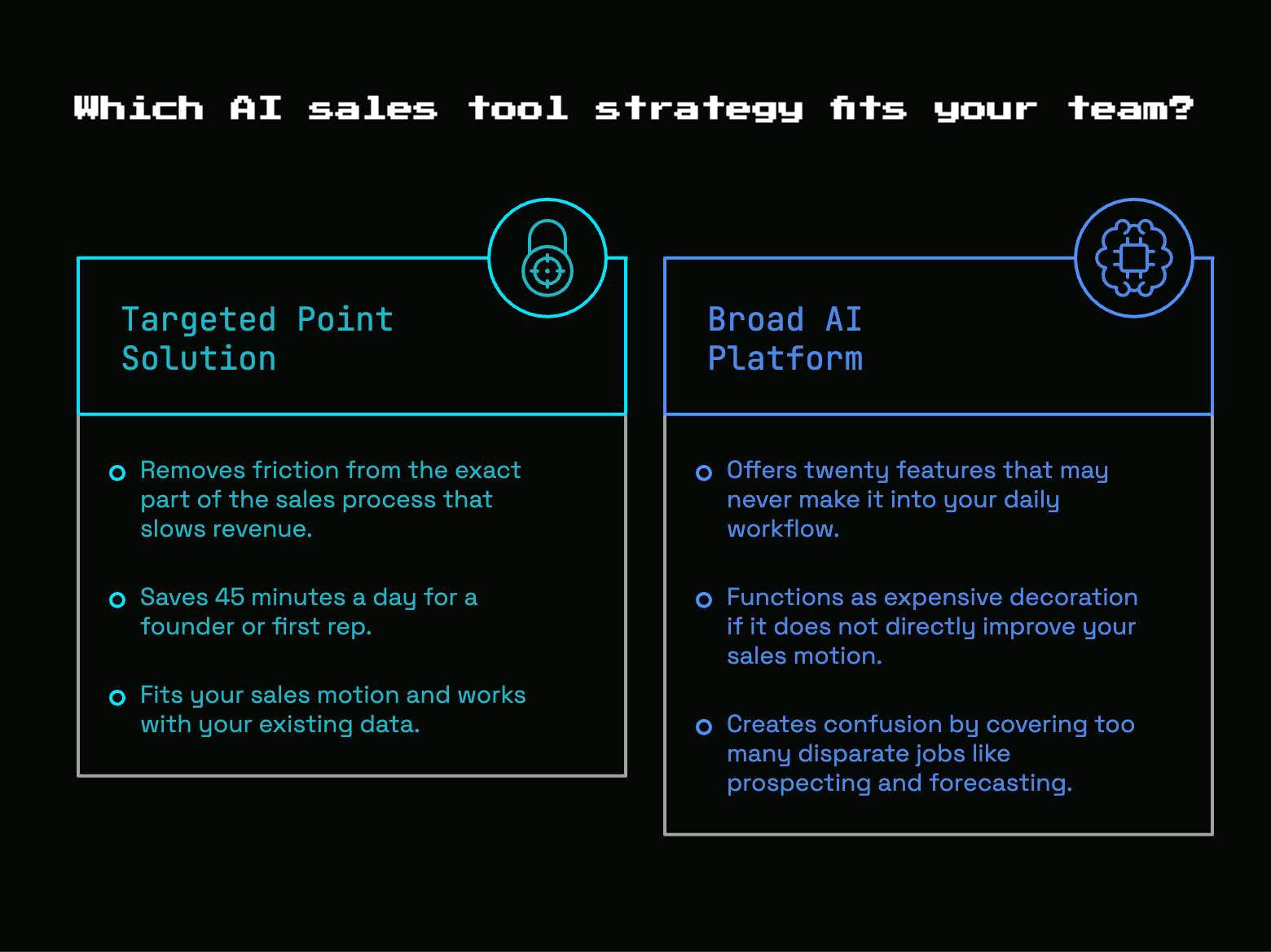
Here’s the thing: the wrong tool can still look impressive in a demo. It can write a polished email, surface a shiny score, or summarize a call in clean little bullets. But if it does not remove friction from the exact part of your sales process that slows revenue, it becomes expensive decoration.
That matters even more when your team is small. If you are bootstrapped, or sitting somewhere between $1M and $5M ARR, every subscription has to earn its place. A tool that saves 45 minutes a day for a founder or first rep is better than a broad platform with twenty features that never make it into your workflow.
Start with the job you need the tool to do
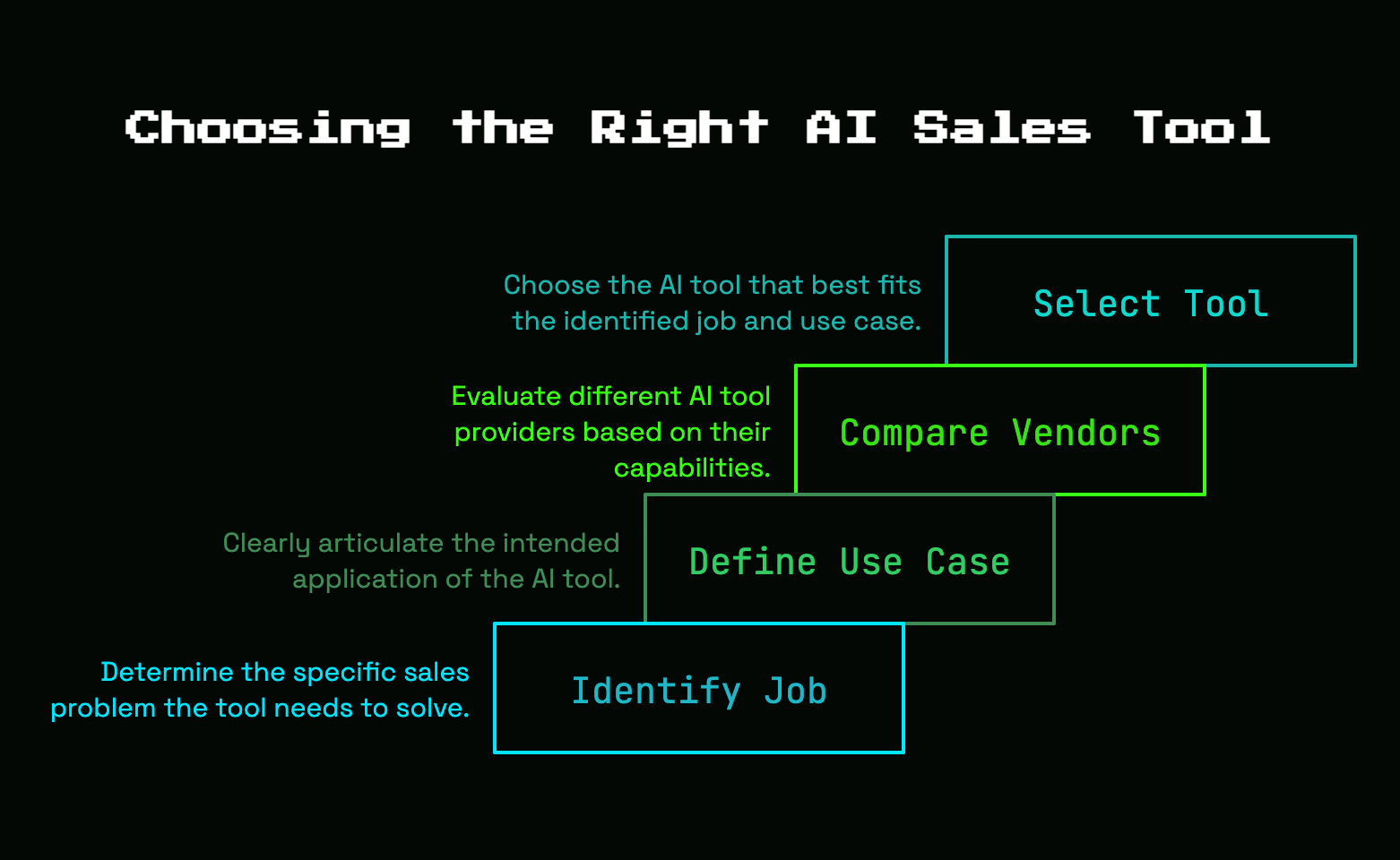
Before you compare vendors, get brutally clear on the job. AI in sales usually helps with one of a few problems: finding the right accounts, spotting signals that suggest timing, personalizing outbound, capturing what happened on calls, keeping the CRM clean, prioritizing deals, or making forecasts less fuzzy.
Those sound related, but they solve different bottlenecks. A call intelligence tool will not fix weak prospect lists. A prospecting tool will not fix sloppy handoffs after demos. A forecasting tool will not magically improve rep follow-up.
That is why use case comes first, and vendor names come second.
Common AI sales jobs worth paying for
The most useful AI sales tools usually sit inside repeatable, slightly boring work. Think account research, contact enrichment, signal monitoring, first-draft outreach, call summaries, next-step extraction, field updates in your CRM, objection tagging, and deal prioritization.
Some of the strongest gains come from timing and focus, not from writing more words. Signal-based prospecting is a good example. When outreach is triggered by something real, like hiring activity, funding, job changes, website engagement, or a new tool showing up in the tech stack, reply rates can jump well past normal cold outbound ranges. In one 2026 prospecting report, 15, 25% reply rates showed up for signal-personalized outreach, compared with the usual 3 to 5 percent cold email baseline.
Another category worth paying for is next-best-action guidance. Not generic “follow up now” alerts, but tools that can look at activity, deal stage, account context, and gaps in execution. Gartner found that sales organizations giving sellers AI-enabled next best actions were 2.6 times more likely to achieve commercial growth. That is the kind of result worth caring about.
Tasks you should not try to automate end to end
Some jobs should stay human, full stop.
AI is great at repetitive research, sorting information, drafting a first pass, spotting patterns, and cleaning admin work off your plate. It is much worse at trust, nuance, and buyer confidence. Discovery calls, objection handling, value framing, multi-stakeholder conversations, and the judgment required to know when not to send the email, those are still yours.
That is not a romantic argument for “human touch.” It is a practical one. Gartner buyer research found that human reps outperformed GenAI in moving buyers forward, building confidence, understanding needs, and quantifying value. Buyers were 28 percentage points more likely to say a rep helped advance the purchase than GenAI.
The trick is simple: automate the prep and the admin, not the relationship.
Map your sales workflow before you shop
Most bad AI tool purchases start too late in the process. A team books demos before mapping how sales actually happens from first touch to closed-won. That is backwards.
Start with your real workflow. How does a target account get identified? What happens before the first email? How long does research take? Where do notes live after a call? Who updates the CRM? Where do deals stall? How do follow-ups get written? When does forecasting turn into guesswork?
Once you lay that out, the waste becomes obvious. Maybe list building is manual and slow. Maybe founder follow-up falls apart after back-to-back calls. Maybe your first AE is doing research in five browser tabs, then forgetting to log next steps. Maybe pipeline reviews feel like archaeology because the CRM is half-empty.
That is the map you buy against.
Find the bottleneck that is actually slowing revenue
There is always one problem that hurts more than the rest. Not enough qualified pipeline. Weak personalization. Slow follow-up. Missing CRM fields. Poor coaching. Unclear stage definitions. Inaccurate forecasting.
Pick one.
Buying a tool for the wrong bottleneck is the fastest way to waste budget, because AI tends to amplify the process already in place. If your ICP is fuzzy, AI will help you target the wrong people faster. If your CRM is dirty, AI scoring will produce polished nonsense. If your reps do not review calls, call intelligence software becomes a storage locker for recordings nobody revisits.
A useful test is this: if this step improved by 30 percent, would revenue feel different in the next quarter? If the answer is no, do not shop there first.
Check what your first sales hire will really use
Adoption reality matters more than feature count. If a founder or first rep cannot use the tool without breaking normal workflow, it will gather dust.
Picture a Tuesday afternoon with prospecting, a customer call at 2:00, a follow-up draft at 2:45, and pipeline cleanup squeezed in before dinner. Does the tool fit into that day naturally, or does it require an extra dashboard, constant prompt writing, or a mini operations project to stay useful?
The catch is that many embedded AI features are still underused. Some recent sales data points show plenty of reps still default to general chatbots instead of the AI sitting inside core tools, which usually means setup is weak, context is missing, or the feature is not good enough to become habit. A tool only counts if it becomes muscle memory.
The core types of AI sales tools
https://www.youtube.com/watch?v=Z9xzPDRrQHw
Once you know the job, the market gets easier to sort. Most AI sales tools fall into a handful of practical buckets.
Prospecting and signal-based outreach tools
These tools help you find accounts and decide when to reach out. The better ones watch for signals like hiring, funding, leadership changes, web visits, content engagement, product usage, intent activity, or technology changes.
This category matters because timing often beats volume. A cold email to a random account is just noise. A message sent right after a prospect posts an open RevOps role, launches a new pricing page, or starts comparing competitors has context behind it.
That is why signal-based selling tends to outperform broad outbound. Some reports show signal-qualified leads delivering better conversion rates, larger deal sizes, and more wins per quarter. But you do not need every signal under the sun. You need the few that actually correlate with buying in your market.
Sales engagement and personalization tools
These tools draft emails, suggest messaging, help build sequences, and pull account context into outreach. In theory, that sounds perfect. In practice, this category has one big problem: generic AI copy is painfully easy to spot.
The best personalization tools do not try to replace your thinking. They reduce research time, surface relevant angles, and help turn context into usable first drafts. The bad ones produce cheerful filler that sounds like it was written by someone who read the prospect’s homepage for six seconds.
If you buy here, evaluate for relevance, not writing flair. A less polished draft with real account context beats a smooth paragraph that could go to 500 companies unchanged.
Conversation intelligence and call coaching tools
This category records calls, creates summaries, extracts next steps, tags objections, spots patterns, and helps with coaching. For founder-led sales and first hires, this is often one of the most practical places to start.
Why? Because it improves multiple things at once. Notes get captured. Handoffs get cleaner. Follow-up gets faster. Coaching stops relying on memory. Patterns across calls become visible instead of anecdotal.
It is also one of the easiest categories to adopt because the value shows up quickly. If a tool can join calls, push a summary into the CRM, and highlight objection trends within a week, your team feels the benefit almost immediately.
CRM enrichment, scoring, and pipeline tools
These tools clean contact and company data, fill missing fields, score leads or accounts, flag at-risk deals, and support forecasting. They can be incredibly useful, but only if the underlying system has some discipline already.
Scoring without decent data is like using a fancy kitchen scale to measure ingredients you forgot to label. Precise, but not helpful.
Look for tools that make the CRM more trustworthy, not just more populated. Better field completion, better account context, and better stage accuracy matter more than mysterious predictive scores.
AI SDRs and autonomous outbound tools
This is the hot category, and it deserves extra caution. These tools aim to automate large parts of outbound: target selection, research, drafting, sequencing, follow-up, and sometimes inbox handling.
That sounds appealing, especially when you are trying to grow without hiring fast. But handing outreach to an agent at scale before your messaging, ICP, and signal logic are sharp is a good way to automate irrelevance.
Use this category carefully. It can help with bounded, recurring work. It can support top-of-funnel coverage. It can test messaging angles faster. But it should not be treated like a magic SDR replacement for a young SaaS company still learning what resonates.
The buying criteria that matter most
This is the part that saves money. Ignore homepage claims and compare tools on a few practical criteria that actually predict success.
Workflow fit beats feature count
The best tool removes steps from work you already do. It should shorten research, reduce copy-paste, draft a usable follow-up, update fields automatically, or surface better priorities inside your existing rhythm.
A giant platform with dozens of modules is not automatically better. In fact, it is often worse for a small team because it asks for more setup, more training, and more behavior change than you can afford.
Direct claim: a smaller tool with one excellent workflow win is usually the smarter buy.
Data quality and real-time context
AI output is only as good as the data feeding it. Stale contact records, wrong titles, outdated company details, or patchy activity history will break personalization, scoring, forecasting, and prioritization.
Fresh signals matter even more. Static firmographic data tells you who a company is. Live signals tell you whether now is the right moment. That distinction is huge.
If a vendor cannot clearly explain where data comes from, how often it refreshes, and how missing context gets handled, treat that as a warning sign.
Integration with your CRM and sales stack
If your team has to copy details from one tab to another all day, the tool is not helping enough. Good integrations with HubSpot, Salesforce, email, calendar, call recording, Slack, and enrichment tools are not a nice bonus. They are part of the product.
This is where a lot of AI tools quietly fail. A demo looks smooth, but daily use depends on brittle syncing or manual exports. Enterprise AI buyers are increasingly favoring integrated platforms over standalone apps for exactly this reason.
For a lean team, fewer handoffs usually means better adoption.
Ease of setup and time to first value
Bootstrapped teams do not have time for a six-week implementation and three internal champions. You want something that can show value quickly, ideally inside the first two weeks.
That means checking admin burden, onboarding time, training needs, prompt configuration, permissions setup, and how much cleanup is required before the tool works. The pilot-to-production gap is real in AI. Plenty of tools look exciting in week one and quietly disappear by week four.
Ask yourself how soon the tool can produce one useful output in a real workflow. A real summary after a real call. A real account brief before a real prospecting block. A real data sync that fixes actual CRM fields.
Transparency, control, and human review
Black-box AI is a bad fit for sales. If a tool scores an account, flags a deal, drafts a message, or recommends a next step, you should be able to inspect and edit the output.
That matters for trust, accuracy, and compliance. Some market research now points to AI governance becoming a standard buying concern, not just an enterprise checkbox.
Look for approval workflows, editable content, explainable scoring, source visibility, and permission controls. You want the tool to assist judgment, not hide it.
Reporting tied to real outcomes
The only reports that matter are the ones tied to business results. More qualified meetings. Faster follow-up. Better reply rates. Less admin time. Cleaner CRM fields. Better conversion by stage. More accurate forecasts.
Avoid vanity reporting. “Messages generated” is not the point. “Summaries created” is not the point. Even “hours saved” can be fuzzy if those hours do not translate into better execution.
Pick one or two measurable outcomes before you buy. Then hold the vendor to them.
How to choose based on your stage and sales motion
The right stack for a 50-rep org is not the right stack for you. Stage matters. Sales motion matters too.
Founder-led sales with no full sales team yet
Keep it light. Your best options are usually note-taking, follow-up drafting, simple account research, and signal tracking. Those tools reduce context switching without adding another system to manage.
At this stage, the goal is not optimization theater. It is protecting selling time. If a tool helps you walk out of a discovery call with clean notes, next steps, and a draft follow-up ready to edit, that is a real win.
Hiring your first SDR or AE
This is where repeatability starts to matter. A first hire needs help ramping into your process without constant founder translation.
Useful categories here include call summaries, outbound support, account prioritization, CRM hygiene, and basic coaching. AI can make standards visible. What a good follow-up looks like. What objections show up often. Which accounts deserve attention first.
That support matters because training is part of the ROI. Gartner found organizations that upskill sellers on AI are far more likely to see strong revenue growth.
Early scaling teams with a few reps
Once you have a few reps, visibility and consistency become more valuable. Conversation intelligence starts to pay off more. So do enrichment, structured scoring, and lightweight forecasting help.
At this stage, standardization is the hidden benefit. Managers can see patterns across calls. Pipeline reviews rely less on gut feel. Reps spend less time doing research from scratch.
But still, resist stack sprawl. Add categories only when a clear workflow gap shows up across multiple reps.
PLG, sales-led, and hybrid motions
Different motions need different signals.
If you run PLG, product usage and expansion cues often matter more than broad outbound data. Activated users, workspace growth, invite spikes, feature adoption, and usage drop-offs can be stronger buying signals than company news.
If you run sales-led, account research, contact coverage, intent, and timing signals usually matter more.
If you run a hybrid motion, stitching product signals and traditional sales context together matters most. That usually means picking tools that can see both worlds instead of forcing your team to guess from partial data.
Budget: where to spend first and where to wait
When budget is tight, spend where friction is highest and ROI is easiest to verify.
A smart first-tool sequence for lean teams
A sensible order usually looks like this: clean up the CRM and call capture first, then add prospecting signals, then improve personalization or prioritization, and only later consider advanced forecasting or autonomous outbound.
That order works because it fixes the foundation before the fancy stuff. Call summaries and CRM hygiene improve execution right away. Signal tools improve targeting next. Scoring and forecasting become more useful only after basic data discipline exists.
Honestly, this is less exciting than buying the flashy agent. It is also usually the right move.
When a bundled platform makes sense
Sometimes the best buy is the feature already sitting inside software you use every day. If your CRM, engagement platform, or call tool already includes capable AI for summaries, drafting, or basic scoring, that can be the smart choice.
Bundled AI often wins on adoption because your team stays in familiar workflow. It may also cost less and reduce integration hassle.
That matters because usage is still uneven. Even though AI use in sales is climbing fast, many reps still underuse embedded features. If you choose bundled AI, commit to enabling it properly so it does not become one more ignored tab.
When point solutions are worth it
Specialized tools earn their keep when the gap is obvious. Better signal data. Better call coaching. Better account research. Better enrichment. Better forecasting support.
A point solution is worth considering when your core platform covers the category badly, or when the workflow win is large and easy to measure. If a specialized research tool cuts prep time by half, or a coaching tool shortens rep ramp meaningfully, specialization can be worth the added vendor.
Just make sure the benefit is specific, not theoretical.
Questions to ask on every demo
A good demo is not a performance. It is a stress test.
Questions about output quality
Ask where recommendations come from. Ask how often data refreshes. Ask what sources feed personalization. Ask how much manual editing is normal. Ask to see output for a real account in your market, not a canned example.
If the tool drafts outbound, paste in one of your target accounts and inspect the result. Is it relevant, or just smooth? If it scores leads, ask what factors drove the score. If it flags deal risk, ask what behavior patterns triggered the alert.
You are not buying the demo. You are buying the average Tuesday output.
Questions about implementation and support
Ask how long setup usually takes for a team your size. Ask who owns onboarding. Ask what has to be configured up front. Ask how much admin work is needed each month. Ask what training is included.
Also ask whether the vendor has examples from early-stage SaaS teams, not just enterprise logos. Your reality is different. You need proof that the tool works with lean teams, limited ops support, and evolving process.
Questions about security, permissions, and data use
This part gets skipped too often. Ask what happens to call recordings, CRM data, customer emails, prompts, and generated content. Ask about retention. Ask whether your data is used to train models. Ask what permissions can be limited by role.
If the tool touches customer communication or sensitive account information, you want simple, plain-English answers. Vague language here is not charming. It is a problem.
Common mistakes when buying AI sales tools
Most bad purchases are predictable. Not random. Predictable.
Buying for demos instead of daily use
Demos are designed to look smooth. Real workflow is messy. That is why polished product tours can hide weak adoption, weak data, or weak output quality.
Always test with real accounts, real call recordings, real follow-ups, and real pipeline reviews. If a tool only looks good with handpicked examples, it is not ready for prime time.
Layering AI on top of a messy process
AI does not fix a broken process by itself. It accelerates whatever is already there.
If your stages are unclear, your ICP is vague, or your CRM is half-complete, clean that up first. Even lightweight discipline goes a long way. Better stage definitions, required fields, and clear handoff expectations make every AI layer more useful.
Expecting AI to replace sales judgment
This is the classic trap. A tool can suggest the next move. It can summarize what happened. It can highlight patterns across calls. It cannot own trust.
For B2B SaaS, especially where deals involve nuance, budget friction, or multiple stakeholders, human judgment is still the thing that moves deals forward.
Adding too many tools too early
Stack sprawl sneaks up fast. One tool for research, one for signals, one for email, one for call notes, one for scoring, one for forecasting, and suddenly your first rep is juggling six systems before lunch.
Pick one meaningful workflow problem first. Fix it well. Then add the next layer only if the previous one is actually being used.
A simple shortlist framework you can use this week
You do not need a six-week procurement project. You need a simple way to compare tools without getting lost.
Score each tool on five factors
Use a 1 to 5 scale and score each option on workflow fit, data quality, integration depth, setup effort, and measurable ROI.
Workflow fit asks: does this remove steps from how you already sell?
Data quality asks: are the inputs fresh, accurate, and useful enough to trust the output?
Integration depth asks: does it connect cleanly to your CRM, email, calls, and other daily tools?
Setup effort asks: can you get useful output quickly without a heavy ops project?
Measurable ROI asks: can you tie success to something concrete like follow-up speed, qualified meetings, rep ramp, stage conversion, or forecast accuracy?
If a tool scores high on two flashy areas but low on workflow fit and setup effort, that is usually your answer.
Run a 14-day real-world test
Pilot with one founder or one rep. Use a small set of target accounts. Define two or three success metrics up front. Then use the tool in a live workflow for two weeks.
A good test might happen during a Tuesday afternoon prospecting block: 25 target accounts, one hour of research, first-pass outreach, and follow-up from any booked conversations. Compare time spent, quality of output, reply rate, CRM completeness, or speed to send follow-ups.
Do not overcomplicate it. If the tool cannot prove value in a focused 14-day test, it probably will not save itself later through wishful thinking.
Best AI sales tools by use case
This is where category fit matters more than brand hype.
Best for saving time on founder-led sales
Look for lightweight tools focused on note-taking, follow-up drafts, and account research. The right category here reduces context switching and helps you move from call to next action without cleanup work hanging over the rest of the day.
Best for outbound teams that need better timing
Prioritize signal-based prospecting and account prioritization tools. If your outbound problem is timing, better signals usually matter more than more sequence logic. Reaching out because something changed beats blasting a larger list.
Best for new reps who need faster ramp and coaching
Conversation intelligence and coaching tools are often the best fit. Summaries, objection tracking, and pattern visibility help new reps ramp faster and help managers coach from real evidence instead of memory.
Best for teams that need cleaner pipeline visibility
Focus on enrichment, scoring, and forecasting support. If pipeline reviews feel murky, choose tools that improve CRM trust and highlight risk clearly. Forecasting gets better when data quality gets better first.
Frequently Asked Questions
Are AI sales tools worth it for a small B2B SaaS company?
Yes, if the tool fixes one expensive workflow problem and gets used consistently. For a small team, the best ROI usually comes from tools that save time on research, call notes, follow-up, or CRM cleanup.
What should you buy first: prospecting AI or call intelligence?
Usually call intelligence or CRM cleanup comes first, because the value is easier to verify and adoption is simpler. Prospecting AI becomes more useful once your follow-up process and pipeline hygiene are under control.
Can AI sales tools replace an SDR?
Not fully, at least not in a way most early-stage SaaS teams should trust yet. AI can support top-of-funnel work, research, drafting, and prioritization, but messaging judgment, buyer trust, and learning from live market feedback still need human ownership.
How do you measure ROI from an AI sales tool?
Start with one before-and-after metric tied to the workflow you want to improve. Good options include qualified meetings booked, reply rate, time to send follow-up, CRM field completion, rep ramp time, or conversion rate by stage.
Should you choose a platform or a point solution?
Choose the option that fits your workflow with the least friction. A bundled platform is often better when adoption is the biggest risk. A point solution is worth it when your existing stack handles a use case poorly and the workflow gain is obvious.
How much AI automation is too much in sales?
It is too much when the tool starts sending buyer-facing communication at scale without enough context, review, or accountability. Automate repetitive prep and admin first. Keep human judgment in the moments that shape trust.
The one next step that makes choosing easier
Pick one sales bottleneck, write down the metric that would prove it improved, and only demo AI sales tools that clearly fix that exact step.
That one move cuts through most of the noise. Try it before you open another tab.


Discussion