

CRM adoption usually fails at 4:45 p.m. on a Friday. That is the moment when a rep skips the extra updates, keeps notes in a tab, and promises to “clean up the CRM later.” If you want reps to actually use it, you need to make the CRM the easiest place to work, not the place where work gets copied after the fact.
What You’ll Need Before You Fix CRM Adoption
Before changing behavior, set the table. If your process, access, and metrics are fuzzy, every training session turns into another speech about “better hygiene,” and nobody changes.
The minimum team to involve
Put four roles in the room: your founder or sales leader, one rep who lives in the system every day, your ops owner, and whoever manages integrations. That mix matters because CRM adoption dies fast when the setup serves reporting but slows selling. A founder sees forecast needs, a rep sees friction, ops sees process breaks, and the integration owner sees where double entry starts.
The tools and access to gather first
Get admin or near-admin access to the CRM, inbox sync, calendar sync, dialer, meeting tool, prospecting tools, and pipeline reports. You need to see where work already happens. If a rep books meetings in one tool, calls from another, and keeps follow-ups in Gmail, the job is to connect those systems, not force more tabs and more typing.
The baseline numbers to pull
Pull your before picture: login frequency, contacts created, activities logged, opportunities updated, forecast accuracy, and time-to-follow-up. Keep it simple. If you cannot show what changed, every fix turns into opinion. Also pay attention to data quality because 47% of users say satisfaction is significantly impacted by bad data, and 41% of sellers cite inaccurate CRM data as their biggest challenge.
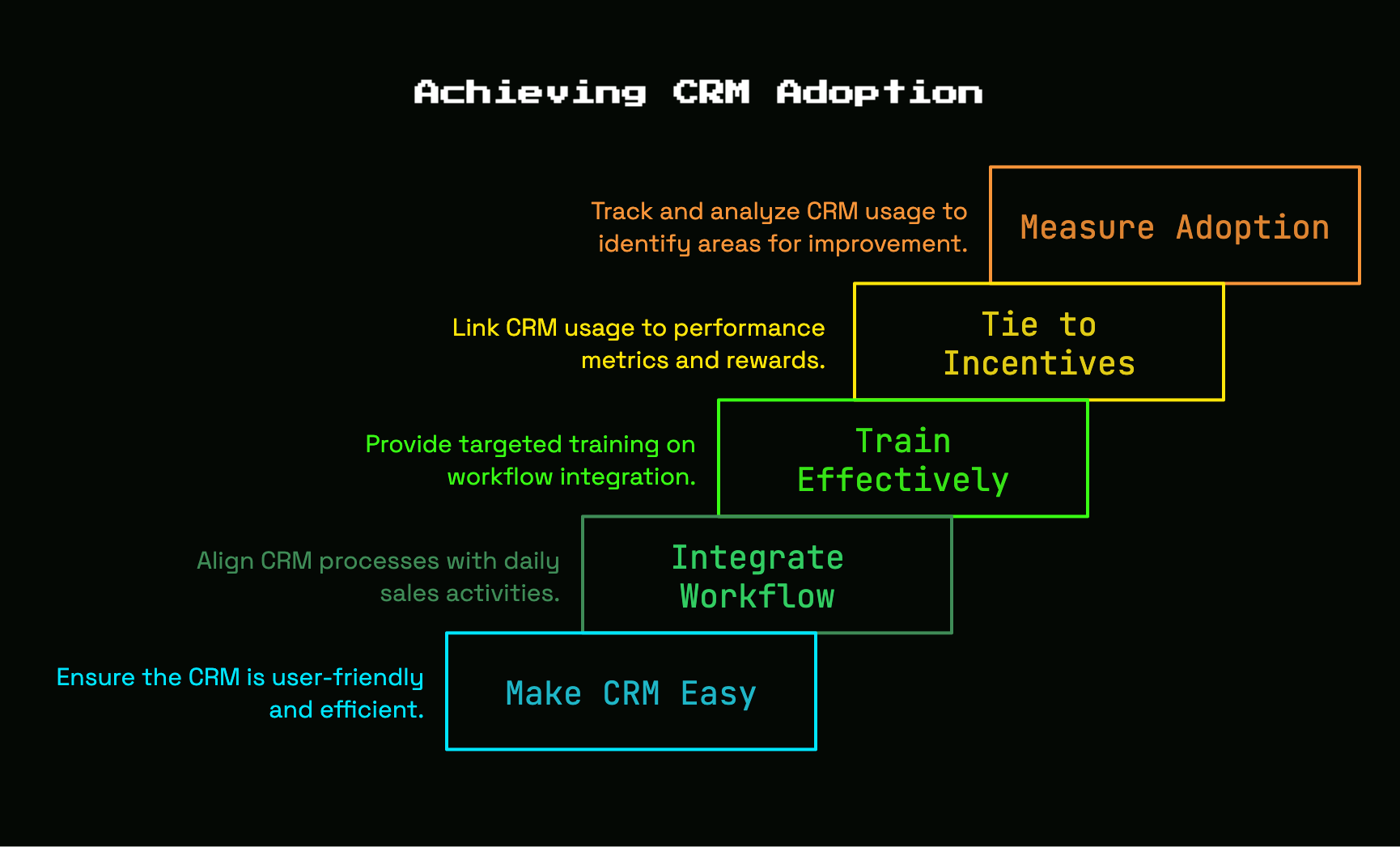
Step 1: Diagnose Why Reps Avoid the CRM
Low usage always has a reason. Find the actual one.
Interview reps around actual daily work
- Ask where notes get captured after a call.
- Ask where follow-ups get tracked.
- Ask what gets updated immediately and what gets postponed.
- Ask what happens late in the day, especially on Fridays.
- Ask which fields feel pointless.
That last question exposes a lot. Reps skip work that feels disconnected from selling. If a field does not help with next steps, coaching, or commission visibility, it becomes dead weight.
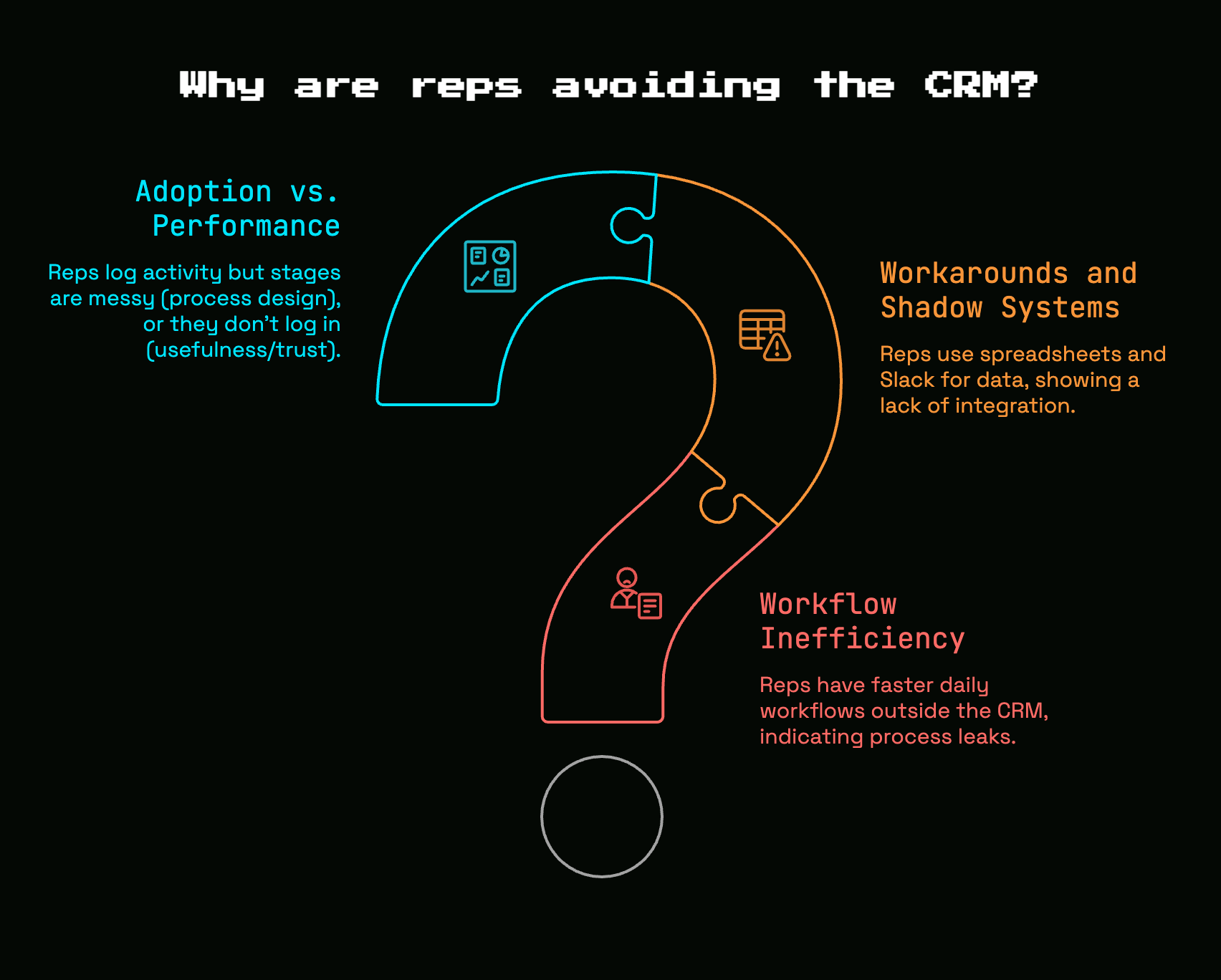
Checkpoint: if reps can explain a clear daily workflow outside the CRM faster than the one inside it, your CRM is losing.
Map the workarounds and shadow systems
- Look for spreadsheets used for pipeline or account notes.
- Check Slack for deal updates that never hit the CRM.
- Review calendar invites, inbox folders, and personal task lists.
- Identify where handoff notes live.
- List every place a rep updates the same deal twice.
Those workarounds are not random. They are your process leaks. Research shows teams lose 15 hours per week chasing data across disconnected systems. That is not a rep discipline problem. That is a workflow problem.
Separate adoption problems from performance problems
If reps log activity but stages are messy, your issue is process design. If almost nobody logs in, your issue is usefulness and trust. Keep those separate. A weak quarter does not automatically mean the CRM is broken. But if pipeline reviews need a side spreadsheet to make sense, then yes, the system is failing the job.
Step 2: Decide What the CRM Must Actually Do
A CRM with twenty jobs does none of them well. Give it a narrow role and enforce it.
Pick the core use cases
- Track pipeline
- Log activity
- Manage follow-ups
- Keep account history
- Support forecasting
That is enough. These are the use cases tied directly to rep action and manager decisions. The CRM should answer three questions fast: what happened, what happens next, and how real is the forecast.
Define “required” versus “nice to have”
Required means the field changes coaching, forecasting, routing, or payout. Nice to have means somebody once wanted it in a report. Cut aggressively. Reps use systems that feel like a checkout line with two items, not a full cart packed to the handle.
Write a plain-English CRM rulebook
Write a short document that defines when a deal gets created, when a stage changes, what counts as a completed activity, and who owns updates after a handoff. Use plain language. “Move to proposal when pricing is shared with a confirmed buying process” beats vague labels every time.
Step 3: Remove Manual Work Before Asking for Better Habits
Do not ask for discipline from a broken system. Fix the friction first.
Turn on automatic activity capture
- Sync email.
- Sync calendar.
- Enable call logging.
- Capture meeting outcomes automatically.
- Verify records attach to the right contact and account.
This is the fastest win in CRM adoption. Reps spend only 34% to 40% of time actually selling. The rest disappears into admin, meetings, and manual tasks. Less typing means more complete records and faster follow-up.
Connect the tools reps already live in
Connect your dialer, inbox, scheduler, and prospecting stack so activity flows into the CRM without a second pass. The catch is simple: if the CRM asks reps to replay work that already happened somewhere else, adoption drops. If the CRM reflects real work automatically, adoption rises.
Cut fields, clicks, and duplicate updates
Trim page layouts. Remove low-value required fields. Stop forcing stage changes to trigger three other manual edits. If a field does not change coaching, forecasting, or follow-up, it should not block a rep.
Step 4: Clean Up the Data So the CRM Stops Lying
Bad data kills trust fast. Once a rep sees duplicate contacts, stale deals, or random stages, confidence disappears.
Audit duplicates and dead records
- Merge duplicate accounts.
- Merge duplicate contacts.
- Close stale opportunities.
- Archive junk leads.
- Reassign orphaned records.
A cluttered CRM becomes a digital junk drawer. And bad data is expensive. Gartner has long warned that poor data quality costs organizations millions per year.
Standardize stages, sources, and ownership
Clean up stage names, lead source values, and ownership rules. If your first pipeline was built by a founder at a coffee shop in Austin with custom labels that felt fine at the time, now is when that improvisation ends. Reports only work when dropdowns mean one thing.
Set a lightweight data hygiene routine
Set a 15-minute weekly review for duplicates, stale deals, and missing next steps. Keep it recurring. AI features depend on clean inputs, and Gartner warns that 40% of agentic AI CRM projects will fail or stall by 2028 because of data quality.
Step 5: Build the CRM Around Rep Workflow, Not Manager Reporting
A rep should open the CRM and know what to do next. Not hunt for it.
Make next actions impossible to miss
- Require a next step on active deals.
- Use task due dates.
- Create reminder rules.
- Surface overdue follow-ups.
- Build call and email queues.
Success looks obvious here. A rep opens a view and sees the next five accounts to touch, not a blank dashboard full of vanity charts.
Create views that match real selling motions
Build saved views for new leads, no-response follow-ups, active deals, and at-risk accounts. Match the flow of a real day. Do not organize everything around departments and reporting lines. A CRM becomes useful when it fits the work in motion.
Put customer context in one place
Store notes, activity history, objections, and deal context on the record where the next person can find it in seconds. This matters once handoffs begin. Nobody wants to piece together account history from Slack, a spreadsheet, and somebody’s memory.
Step 6: Train Reps on Their Workflow, Not on the Software Menu
Feature tours are forgettable. Task-based training sticks.
Train on real scenarios from your pipeline
- Book a demo from an inbound lead.
- Move a deal to proposal.
- Revive a quiet account.
- Log a call and set a next step.
- Update close date and amount correctly.
Use real examples from your pipeline. Training lands when reps recognize the work.
Keep the playbook short and searchable
Document a few repeatable workflows with screenshots or short videos. Keep each one focused on a task, not a menu. Nobody opens a 40-page CRM manual after day one.
Make managers reinforce the same process
Managers must run one-on-ones, forecast reviews, and pipeline meetings from CRM data. If coaching happens in docs, spreadsheets, or Slack, reps learn one lesson fast: the CRM is optional.
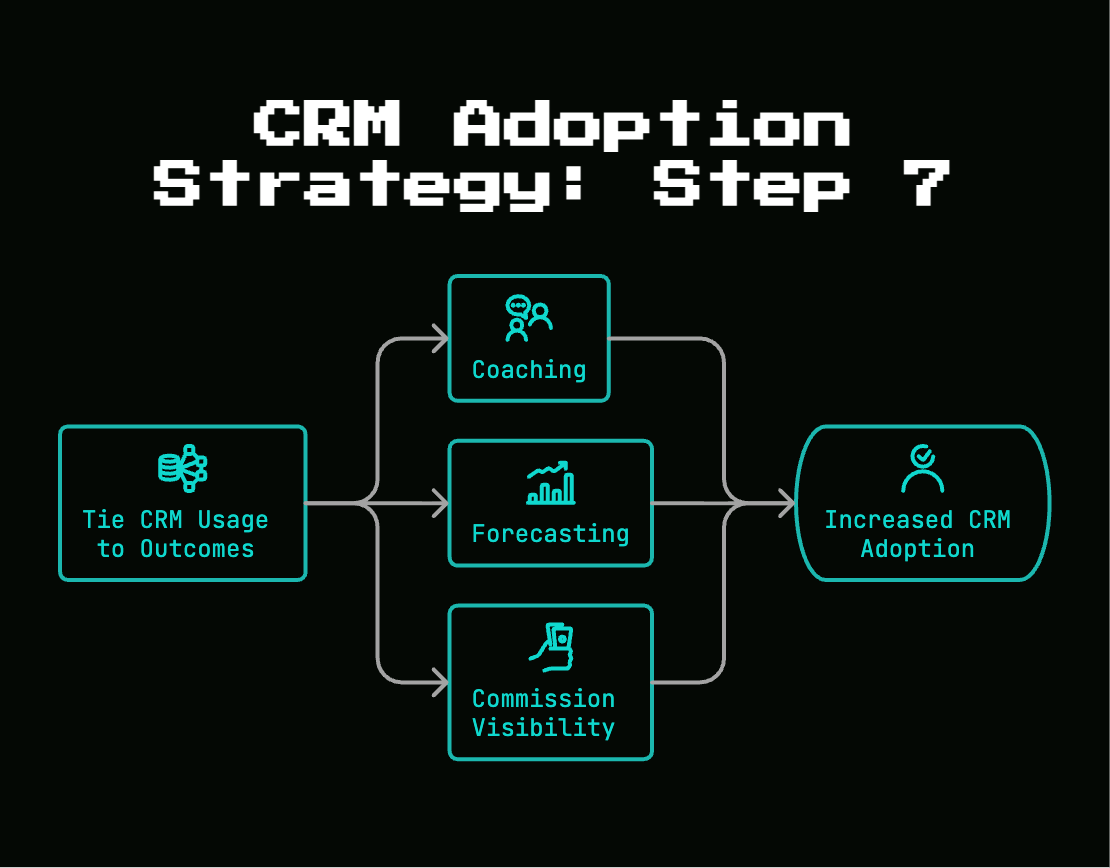
Step 7: Tie CRM Usage to Coaching, Forecasting, and Commission Visibility
People use systems that affect outcomes they care about. Make the link obvious.
Run pipeline reviews only from CRM data
Stop accepting side spreadsheets and verbal-only updates. Set the rule clearly: if it is not in the CRM, it is not in the forecast. That resets behavior fast.
Use CRM data for coaching, not surveillance
Review follow-up speed, stalled deals, and activity gaps to improve selling quality. Keep the tone practical. Nobody resists coaching that helps close business. Everybody resists pointless monitoring.
Make commission-related data visible and trustworthy
Clean opportunity data reduces disputes and improves payout confidence. When stage accuracy affects money, reps pay attention. That is not punishment. That is alignment.
Step 8: Launch the New Process With a Clear Cutover
A half-old, half-new rollout creates permanent confusion. Pick a date and switch.
Announce what changes and what stops
Spell out which spreadsheets, side docs, and manual reports are done. Clear cutovers beat soft requests every time.
Give reps a simple day-one checklist
- Connect inbox and calendar.
- Confirm task and reminder settings.
- Update all open deals.
- Add next steps to active opportunities.
- Use the new saved views.
Checkpoint: by end of day one, every active deal should have an owner, stage, close date, and next step.
Set a 30-day review cadence
Review usage weekly for the first month. Fix annoyances quickly. Small friction points become permanent workarounds if you ignore them.
Step 9: Measure Real CRM Adoption, Not Empty Activity
More clicks do not mean better adoption. Useful usage does.
Watch leading indicators of useful usage
Track active records, complete next steps, timely stage updates, response speed, and activity captured automatically. Those metrics show whether the CRM supports work instead of just recording motion. Mobile access also matters because 65% of reps using mobile CRM hit quota versus 22% who do not.
Compare adoption to selling outcomes
Compare usage quality to pipeline coverage, conversion rates, forecast accuracy, and follow-up consistency. This is where CRM adoption proves itself. Businesses using CRM effectively were 86% more likely to exceed sales goals, but only when the system reflects actual work.
Review friction signals every month
Look for more spreadsheet exports, stale opportunities, missing next steps, and incomplete fields. Adoption is not a launch event. It is maintenance.
Troubleshooting Common CRM Adoption Problems
Even a good rollout drifts. Fix the pattern, not just the symptom.
Reps say the CRM takes too long
Check required fields, integration gaps, and page layout clutter. The fix is almost always less manual work, not another reminder to “be better.”
Managers still ask for updates in Slack or spreadsheets
Stop side-channel reporting. If updates happen outside the CRM, the old habit wins. Every time.
Data gets messy again after a few weeks
Restore ownership, re-run weekly cleanup, and tighten stage definitions. Mess spreads quickly when nobody owns correction.
Forecasts still feel unreliable
Trace the problem to stage discipline, close-date accuracy, or inconsistent opportunity creation. Forecast pain points almost always expose a loose process rule.
What Success Looks Like and What to Try Next
Good CRM adoption feels boring in the best way. The system stops being a debate and starts being the place where selling happens.
The signs your CRM is finally part of the sales workflow
You will notice deals getting updated during the day, not days later. Follow-ups stop slipping. Managers trust pipeline reviews without chasing side notes. Handoffs carry context. And because 74% of users say CRM improves access to customer data, the value becomes obvious once the data is clean and current.
Your next improvement after adoption
Once usage is stable, automate follow-ups, improve lead routing, and prepare your data for AI features. But do that in the right order. Only 19% of reps use AI built directly into their CRM, and adoption stays low when the underlying records are messy.
Try one thing this week
Remove three required fields from your opportunity form, or ban spreadsheet-based pipeline reviews. Pick one friction point and cut it. That single change is often what gets reps to actually use the CRM.


Discussion