

CRM data hygiene is the ongoing work of keeping your CRM accurate, complete, standardized, current, and usable. It matters because your pipeline, routing, forecasting, and outbound motion are only as good as the records underneath them. If your CRM feels messy already, that is not proof your team is sloppy. It is the default outcome when growth, hiring, and tools move faster than process.
What CRM Data Hygiene Actually Means
CRM data hygiene sounds technical, but the idea is simple: your CRM should reflect reality closely enough that your team can trust it and act on it. A clean CRM has the right person at the right company, the right owner, the right stage, the right timestamps, and the right links between records. Nothing fancy. Just reliable.
The key word is ongoing. CRM data hygiene is not a one-time cleanup sprint after a painful board deck or a bad quarter. It is the operating discipline that keeps your system from quietly drifting into fiction.
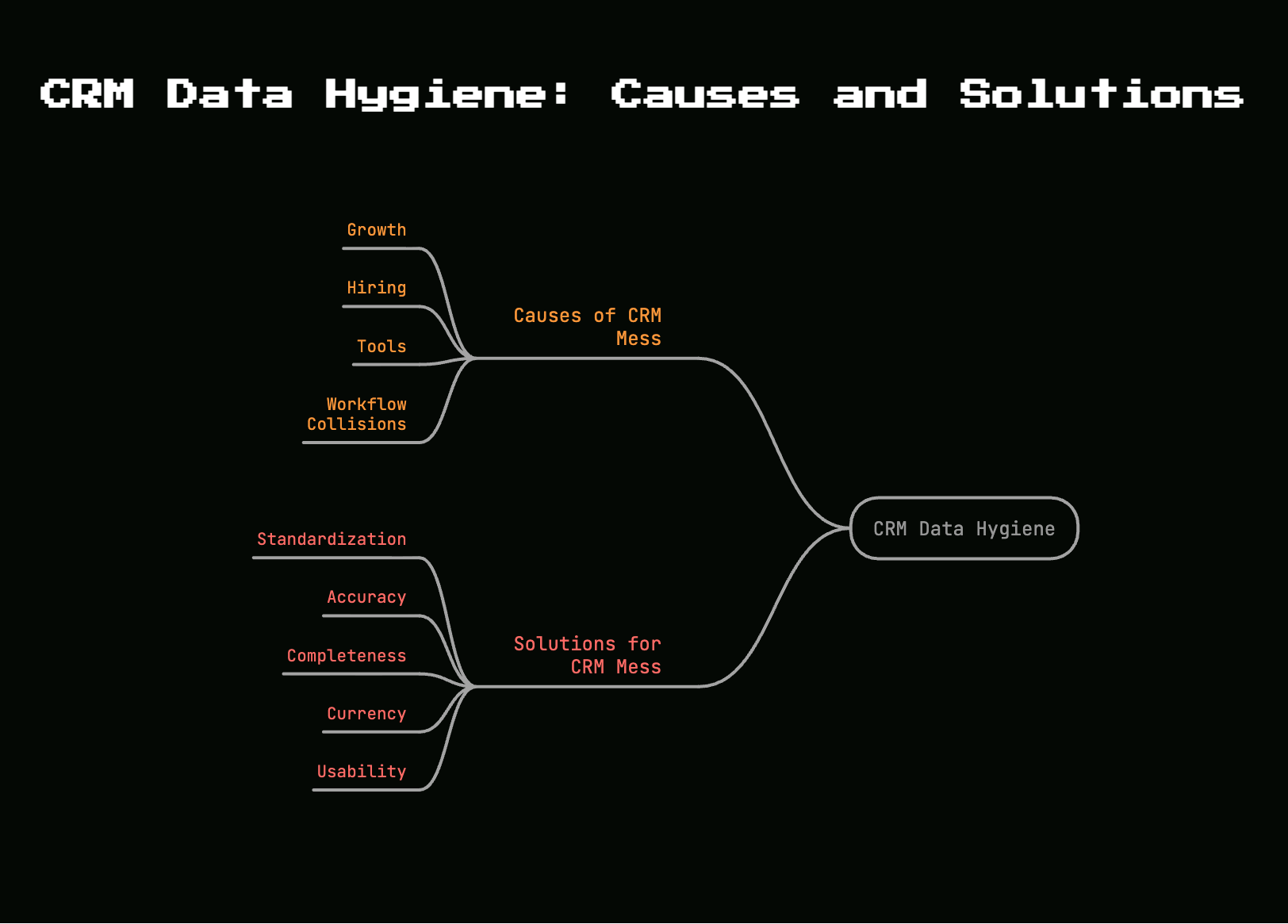
And here’s the thing: CRM mess is not a sign of a bad team. It is what happens by default. Your founder closes early deals in one way. Then your first rep joins and uses different naming habits. Marketing adds a form. Product adds lifecycle signals. A billing sync comes online. Somebody imports a CSV on a Tuesday night to get a webinar list into a sequence. Now your CRM is no longer one workflow. It is ten workflows colliding.
Why Your CRM Gets Messy So Fast
Your CRM gets messy because data decays naturally. Left alone, it does not stay clean.
Think about a kitchen counter. You clear it off, it looks great for about six hours, then mail, chargers, receipts, and random keys start showing up. The counter is not broken. Gravity and habit win unless the system makes cleanup automatic. Your CRM works the same way. Contact details change, account status shifts, syncs drift, and humans take shortcuts under pressure.
The result is predictable. Records age out. Integrations write conflicting values. Old opportunities linger. Fields fill up with variations of the same answer. Unless your setup actively prevents disorder, disorder returns.
Data decay is normal, not surprising
People change jobs. Titles change. Teams get reorganized. Companies rebrand, merge, downsize, or disappear. A buyer who was Head of RevOps in January is gone by October. A direct dial works for three months, then stops connecting. An account marked as a perfect fit last quarter cuts headcount and no longer belongs in your target segment.
That is normal B2B reality. In fact, 22.5% per year is a common benchmark for contact data decay, and some sources put it even higher. Another useful rule is freshness: if contact data has gone untouched for 90 days, you should stop treating it as trustworthy. Not dead, just unverified.
Role and company movement is the biggest driver. Research shows 70.8% of business contacts change roles, companies, or responsibilities within 12 months. That means your CRM is not a filing cabinet. It is a moving target.
Mess compounds as soon as you hire and add tools
The jump from founder-led selling to a real go-to-market motion is where mess accelerates. At $1M to $5M ARR, your team usually sits right in that transition. One person no longer owns every deal. Handoffs start happening. Definitions matter now.
Your first SDR creates a naming habit for account records. Your first AE updates stages in a way that makes sense in the moment. Marketing starts caring about lifecycle stage and source attribution. Somebody connects enrichment. Somebody else connects call recording. Then product usage data and billing status enter the picture.
Each addition looks reasonable by itself. Together, they create inconsistency. The CRM starts capturing more activity, but trust goes down because nobody locked down what fields mean, which tool owns what value, or how conflicts get resolved. That is how a decent system becomes noisy fast.
What “Messy CRM” Looks Like in Real Life
Messy CRM data is not an abstract quality problem. You see it in record views, reports, routing, and daily rep work.
An account opens with three similar company records. A deal has no primary contact. A dashboard says pipeline is healthy, but half the close dates are stale. A sequence hits a person who already became a customer. A territory rule sends a qualified lead to the wrong rep because the state field says “California,” “CA,” and “Calif” across different records.
If your team keeps checking Slack, spreadsheets, inboxes, and memory to confirm what the CRM says, your CRM is already failing its basic job.
Duplicate records
Duplicates are one of the easiest problems to spot and one of the most damaging to ignore. You get duplicate contacts when the same person enters through a form, a calendar sync, an import, and an enrichment tool. You get duplicate companies when one record uses the legal entity name and another uses the brand name. You get duplicate deals when outreach starts from two paths and nobody notices until pipeline review.
The damage spreads quietly. Activity history gets split across records, so outreach looks incomplete. Attribution breaks because the original source lives on one contact while the meeting and opportunity live on another. Forecasting gets inflated when duplicate opportunities stay open. Even basic customer experience gets worse because your team reaches out twice or routes the same account in two directions.
A healthy CRM aims for extremely low duplication. Once duplicates climb, trust falls fast.
Missing, outdated, and inaccurate fields
Completeness means the fields you need are filled in. Accuracy means those fields match reality. Both matter, and they fail in different ways.
You see completeness problems in blank lifecycle stage fields, missing owners, empty lead source values, and opportunities with no next step. You see accuracy problems in stale titles, wrong employee counts, dead phone numbers, and accounts marked active long after the company shut down or churned.
Those issues sound small until you trace the impact. A blank owner breaks follow-up. A wrong segment sends the account into the wrong sequence. A stale title makes personalization feel clueless. A dead number wastes rep time and lowers confidence in the list.
Inconsistent formats and definitions
Inconsistent data is what happens when your CRM accepts too many ways to say the same thing. Free-text fields are usually the main offender. One record says “VP Sales,” another says “Vice President of Sales,” another says “V.P. Sales.” Country is “United States” in one place, “US” in another, and “USA” somewhere else.
This breaks reporting faster than most teams realize. If your segmentation logic depends on exact values, inconsistency creates false negatives everywhere. Routing rules miss records. Lists pull incomplete audiences. Reports show weird category counts that nobody trusts.
Definitions create an even bigger problem. If marketing treats lifecycle stage one way and sales uses the same term differently, your CRM turns into a system full of labels without shared meaning. “Qualified” stops being useful. “Opportunity” turns squishy. Forecast conversations get longer because the data no longer settles arguments.
Broken relationships between records
The CRM is not just fields. It is relationships. Which contact belongs to which account, which deal belongs to which buying group, which activity belongs to which opportunity.
When those relationships break, context disappears. Contacts get attached to the wrong account after a company switch. Deals sit open with no primary contact, so nobody really knows who the buyer is. Child records exist without parents. Product usage data lands on one object while billing data sits on another with no reliable connection.
Sync issues make this worse. One system updates a company status to churned, while another keeps the account in active marketing audiences. One tool sees a person as a prospect, another sees the same person as a customer admin. Your source of truth stops being a source of truth.
The Real Reasons CRM Hygiene Breaks
Bad CRM hygiene is usually blamed on software. That is almost never the real cause. Your CRM gets messy because ownership, rules, and workflows are unclear.
Software stores what your operating model permits. If your system allows ambiguity, you will get ambiguity at scale.
Manual entry under pressure
Reps work for speed. Founders work for speed. Anyone trying to hit a number enters whatever gets the task done now. A field gets skipped because the call matters more. A title gets pasted in free-form because nobody wants to hunt through a picklist. A close date gets pushed forward just to clear the reminder.
That behavior is rational in the moment. It is also exactly how bad data accumulates.
Speed without guardrails always creates cleanup later. Typos, blanks, shorthand labels, and copied old values do not stay isolated. They flow into routing, lists, reports, and automations. Research shows reps lose 27.3% of their time to invalid or outdated leads. That is not a minor admin annoyance. That is selling time disappearing.
No clear owner for data quality
Everybody touches the CRM. Nobody owns the standards. That is the classic failure mode.
Without an owner, field requests pile up with no review. Integrations get added with no conflict rules. Duplicates get noticed but not fixed systematically. Definitions drift because nobody maintains them. The CRM becomes a shared space with no one responsible for keeping it usable.
This is an operating model problem, not a software problem. One person does not need to do every cleanup task, but one person must own the rules, audits, approval process, and exceptions. If ownership is vague, hygiene breaks by design.
Too many tools, weak sync logic
A modern B2B SaaS stack writes customer data from multiple directions: marketing automation, enrichment, call tools, product analytics, billing, support, spreadsheets, and manual imports. The issue is not having tools. The issue is weak sync logic.
One bad integration can spray bad data everywhere. If your billing system says “customer,” but your CRM lifecycle stage does not update cleanly, marketing keeps targeting active customers. If product usage writes account status one way and sales updates it another way, reporting starts contradicting itself. If imports bypass validation rules, your nice clean picklists become free-text junk overnight.
Here’s the catch: every sync needs rules. Which system is authoritative for each field? Is the sync one-way or two-way? What happens when values conflict? What gets logged when a sync fails? Without those answers, your stack is not integrated. It is arguing with itself.
Custom fields and legacy records pile up
Early-stage teams create CRM clutter one quick fix at a time. A field gets added for one campaign. Another for one enterprise prospect. Another for a rep who wants a custom report. Then nobody removes anything.
A year later, your CRM has dead lead sources, abandoned lifecycle properties, duplicate segmentation fields, and pipeline stages that nobody uses but nobody dares delete. Legacy records sit around with old definitions baked in. Active reps ignore half the fields because the form looks like a tax return.
This clutter does real damage. Too many fields lower completion rates. Old properties confuse onboarding. Reports become harder to build because multiple fields appear to answer the same question. More data does not help if nobody trusts or uses it.
Why Bad CRM Data Hurts Revenue, Not Just Reporting
Teams often treat CRM hygiene like admin work. That is a mistake. Bad CRM data costs revenue.
The direct costs show up in wasted sales time, weak targeting, bad forecasting, and broken automation. The indirect cost is just as damaging: false confidence. A dashboard with bad inputs still looks polished. That is what makes dirty CRM data dangerous.
Sales loses time and misses reachable buyers
Bad routing sends the right lead to the wrong rep, or to nobody at all. Dead emails create bounce-heavy sequences. Duplicate records trigger duplicate outreach. Stale records keep reps working accounts that no longer exist while reachable buyers get ignored.
This is where bad data stops being theoretical. If reps spend morning hours cleaning lists, checking LinkedIn, and cross-referencing company info before sending anything, your CRM is actively slowing revenue down. In one common pattern, an AE opens a target account, sees no recent activity, starts outreach, then notices after the third touch that the SDR had been working the duplicate record for two weeks. That is wasted motion and avoidable friction.
Marketing spends budget on the wrong audience
Marketing feels CRM hygiene failures in segmentation first. If lifecycle stage, account status, or company attributes are wrong, targeting breaks. So does suppression.
That means paid spend reaches converted users, nurture flows hit existing customers, and scoring models rank the wrong accounts as priority. One documented case showed 30% of ad spend wasted because converted customers stayed in target lists after sync failures. The problem was not creative or channel strategy. It was dirty CRM logic.
Segmentation only works when the underlying fields are reliable. A smaller clean audience beats a larger confused one every time.
Forecasting and pipeline reviews turn into guesswork
A forecast is only as credible as the opportunities behind it. If close dates stay stale, stages mean different things to different reps, and duplicates inflate pipeline, your forecast turns into negotiation instead of analysis.
You see this in pipeline review immediately. The report says enough coverage exists, but a closer look shows old opportunities lingering in stage two for 90 days, duplicate expansions under separate account records, and deals missing next steps. Nobody trusts the number, so the meeting becomes a manual cleanup session.
That is not a reporting issue. That is a planning issue. Hiring, spend, and board communication all get worse when pipeline data is unreliable.
AI and automation just scale the mess
AI does not rescue bad CRM data. AI scales whatever data quality you already have.
If your lead scoring model trains on noisy lifecycle stages, it learns noise. If your routing workflow depends on inconsistent segmentation fields, it sends leads to the wrong queue faster. If your enrichment agent writes to duplicate records, you get cleaner duplicates instead of a cleaner CRM.
This is why AI readiness starts with hygiene. Research consistently points out that AI systems inherit source defects. Automating a messy CRM is like putting a faster engine in a car with bad alignment. You move quicker in the wrong direction.
The Core Components of Good CRM Data Hygiene
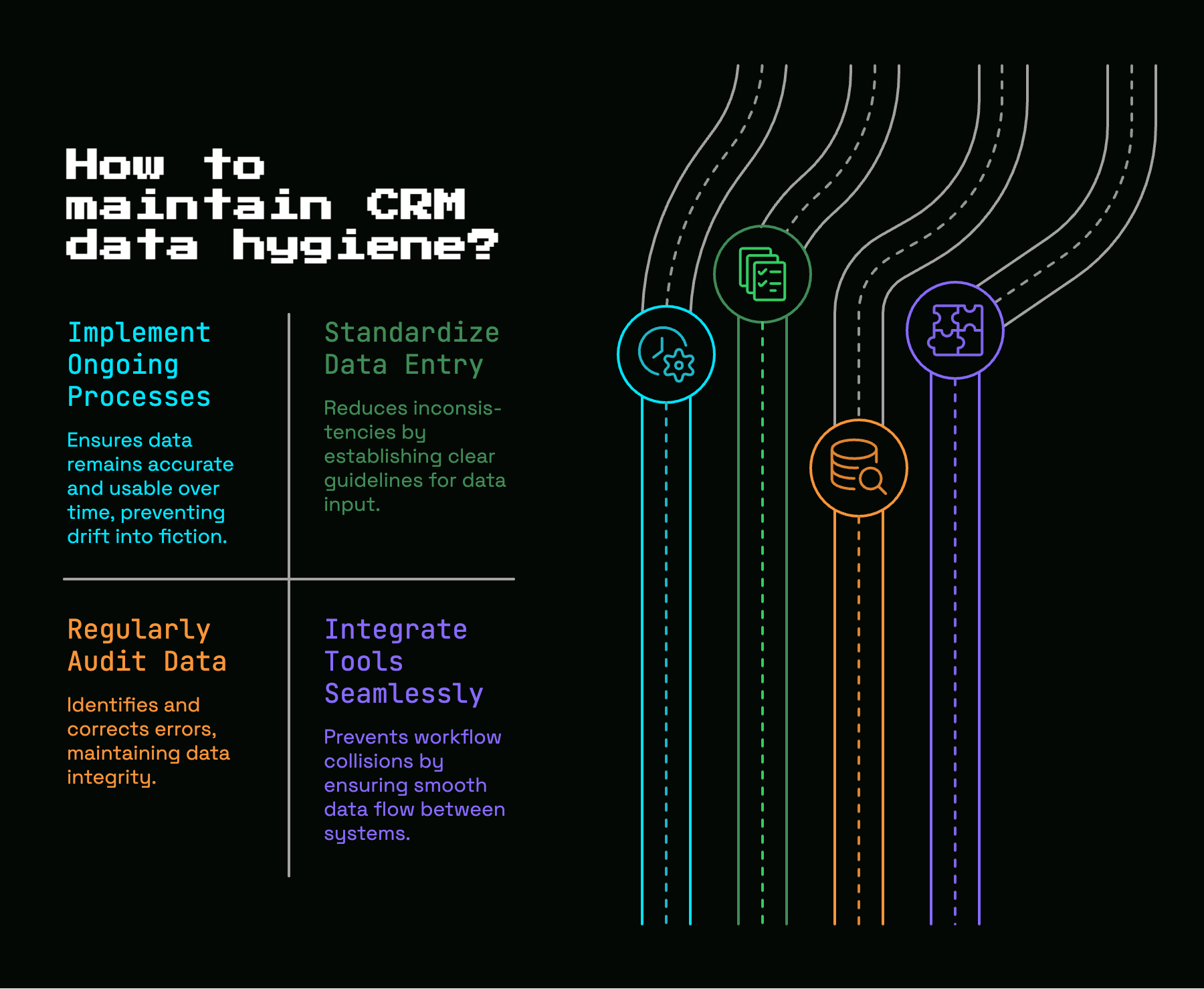
Good CRM hygiene is easier to manage when you break it into a few simple standards. If a record is accurate, complete, consistent, fresh, and unique, it is usually usable.
Accuracy
Accuracy means the data matches reality right now. The right person. The right company. The right role. The right contact details. The right account status.
This sounds obvious, but accuracy is where trust lives. If a title is wrong or a company attribute is outdated, downstream decisions get weaker immediately. For active accounts and active opportunities, accuracy is non-negotiable.
Completeness
Completeness means the fields required for action are present. Not every field. The right fields.
That distinction matters. “Must have” fields drive routing, scoring, segmentation, forecasting, ownership, and handoffs. “Nice to have” fields support research or personalization but do not block the workflow. If your team treats every field like a must-have, completion rates collapse. If your team treats must-have fields like optional notes, execution breaks.
Consistency and standardization
Consistency means one format and one definition for each important field. Standardization is how you get there.
This is where picklists, naming conventions, date formats, country and state standards, and lifecycle rules earn their keep. Without standardization, your CRM ends up saying the same thing in ten different ways. Research on input controls shows why required fields and formatting rules matter: without them, “New York,” “NY,” and “NYC” become separate reporting buckets instead of one clean value.
Freshness
Freshness means the record is current enough to trust. Old untouched data is dangerous because it still looks valid.
For B2B contact data, a 90-day freshness window is a good operating rule for active records. Beyond that, confidence drops quickly. Research recommends treating 90 days as the maximum freshness window for contact trust and using quarterly refreshes as a baseline.
Uniqueness and valid relationships
Uniqueness means one real-world entity maps to one clean record. Valid relationships mean the right contacts, accounts, and deals are linked correctly.
You need both. A unique account with broken associations is still hard to work. A perfectly linked set of duplicate contacts is still duplicate chaos. Clean CRM structure depends on distinct records plus trustworthy relationships.
How to Audit a Messy CRM Without Getting Lost
The biggest audit mistake is trying to inspect everything at once. That is how teams get overwhelmed and quit halfway through.
A useful CRM audit starts small and stays tied to revenue. You are not cleaning your attic. You are fixing the parts of the machine that determine who gets routed, worked, measured, and forecasted.
Start with the fields tied to revenue
Not every field deserves equal attention. Start with lifecycle stage, lead source, owner, account status, next step, close date, key segmentation fields, and routing fields. If those are wrong, your GTM system is flying crooked.
This priority keeps the audit practical. A blank “favorite webinar topic” field does not matter. A blank owner on an inbound demo request absolutely matters. Focus first on fields that trigger action or shape reporting.
Check by failure pattern, not by object alone
Do not audit only by object, like “all contacts” or “all companies.” Audit by failure pattern across objects: duplicates, blanks, invalid formats, stale timestamps, orphaned records, and conflicting values.
This gives structure to the work. Instead of wandering through thousands of records, you ask narrower questions. Which active opportunities have stale close dates? Which accounts have no owner? Which contacts use invalid phone formatting? Which deals have no primary contact? That approach turns the mess into manageable queues.
Pull a small sample and inspect actual records
Reports help, but record-level inspection tells the truth. Open a small sample of accounts, contacts, and opportunities from the last 30 to 90 days and look closely.
That is where patterns jump out. In a Friday pipeline review, for example, you might spot three “open” opportunities from March still carrying last quarter’s close date, each with no updated next step. One record shows a duplicate company. Another has activity on the contact but not on the deal. That ten-minute inspection often reveals more than a fancy dashboard.
How to Clean Up the Core Problems
Once you know the failure patterns, cleanup gets simpler. Not easy, but simple. Fix the structural problems first, then clean the records affected by them.
Merge duplicates and define survivorship rules
Deduplication works only when you decide which values win. That is survivorship. If two records conflict, which source is authoritative for title, phone, owner, lead source, and lifecycle stage? If one record has richer activity history but another has cleaner company data, how do you merge without losing context?
Without these rules, duplicate cleanup becomes repeat work. You merge records today, then recreate the same conflict tomorrow because no source hierarchy exists. Preserve activity history, choose a clear winner by field, and document the logic.
Remove junk and archive dead records
Not every record deserves saving. Obvious trash should be deleted. Obsolete contacts should be archived. Old lists, dead lead sources, abandoned statuses, and unused fields should be retired.
This is where your CRM starts feeling lighter. Less clutter means better completion rates, cleaner reports, and faster onboarding. If a field no longer drives routing, segmentation, reporting, or handoffs, it should stop occupying space in active workflows.
Fix required fields and normalize formats
After junk removal, fix the fields that matter most to operations. Update required values for routing, forecasting, handoffs, and segmentation first. Then normalize formatting across high-use properties.
Replace free-text where possible with controlled picklists. Lock down date formats. Standardize ownership logic. Clean titles only when they affect routing or segmentation. The point is not perfection. The point is reliable execution.
Enrich what matters instead of enriching everything
Enrichment helps, but only when it is focused. Do not try to append every possible field to every record.
Start with high-value gaps tied to your ICP and workflows: company size, industry, role, verified email, verified phone, account status. If those fields improve routing, prioritization, or segmentation, enrich them. If a field exists only because somebody wanted it in one report eight months ago, skip it.
Focused enrichment beats data hoarding. Clean and useful wins.
How to Stop the Mess From Coming Back
Prevention matters more than cleanup. Cleanup resets the system. Prevention changes it.
If you only clean records, your CRM returns to the same messy state. If you change capture rules, ownership, review cadence, and onboarding, the system stays healthier with less effort.
Set data entry rules at the point of capture
The best hygiene control is the one that blocks bad data before it lands. Use required fields, validation rules, picklists, default values, and form logic at the moment data enters the CRM.
This is where prevention beats cleanup every time. A required owner field is cheaper than a routing investigation later. A country picklist is cheaper than fixing segmentation logic after five imports. Real-time validation catches bad entries while context still exists.
Assign ownership and document the rules
Somebody needs authority over standards, audits, field requests, integration changes, and exceptions. If that owner is your founder, first ops hire, or GTM lead for now, fine. What matters is clarity.
Document the rules lightly and keep them where the team actually works. A short internal page that defines stage meanings, field ownership, source-of-truth systems, and import rules is enough to start. Documentation does not need ceremony. It needs usage.
Put hygiene on a cadence
Good hygiene runs on a calendar, not on panic.
Daily, review failed syncs and routing errors. Weekly, check duplicates and stale opportunities. Monthly, inspect field usage and segmentation quality. Quarterly, archive dead records, refresh active data, and revisit definitions. Research-backed guidance supports this kind of quarterly refreshes plus lighter ongoing checks in between.
Cadence turns hygiene from cleanup theater into operations.
Build hygiene into onboarding and incentives
New reps copy the system in front of them. If the CRM allows sloppy updates, sloppy updates become team culture. If the handoff process requires a real next step, a real owner, and a clean stage definition, those habits spread instead.
Keep onboarding simple. Show what a correct account, contact, and opportunity record looks like. Show how to handle duplicates. Show what not to do. And never create compensation logic that rewards rushed record updates over accurate ones. People follow incentives fast.
The Minimum Viable CRM Hygiene System for an Early-Stage SaaS Team
You do not need a giant RevOps function to run a clean CRM. Early-stage teams need a lean system that protects the basics without creating bureaucracy.
If you have no RevOps hire yet
Use the simplest version that works: one owner, one rules doc, one monthly audit, required fields on key objects, and one repeatable dedupe process.
That setup is enough to create accountability and stop the most damaging drift. The trick is restraint. Do not build a big governance framework you will not maintain. Lock down the high-impact fields and review them consistently.
If you just hired your first sales rep
Before habits spread, lock down stage definitions, account ownership, lead source rules, handoff steps, and mandatory next-step hygiene.
This is the moment when “good enough” founder memory stops scaling. If your first rep learns in a loose system, every future cleanup gets harder. Early discipline saves painful rebuild work later.
What to automate first
Automate the boring, high-impact controls first: dedupe alerts, enrichment for key fields, validation at form entry, stale-opportunity flags, and failed-sync monitoring.
Avoid building a giant stack just because tools exist. More tools without stronger rules create more ways to write bad data faster. Start with automation that reduces manual entry, blocks obvious errors, and surfaces exceptions quickly.
Common Misconceptions About CRM Data Hygiene
Bad assumptions keep teams stuck longer than bad tools do.
“A one-time cleanup fixes it”
It does not. A cleanup without governance is just a reset button. If the same loose rules, free-text fields, sync conflicts, and ownership gaps remain, the countdown to the next mess starts immediately.
“This is an admin problem”
It is not. Sales behavior, marketing workflows, leadership definitions, and system design all shape the CRM. Your CRM is a reflection of how your GTM system actually runs. If the data is messy, the operating model is telling on itself.
“More data is always better”
More low-trust data creates noise, not insight. A smaller set of reliable fields beats a giant graveyard of unused properties every time. If a field does not support routing, segmentation, reporting, forecasting, or handoffs, it probably belongs in the trash.
“AI will clean it up for you”
AI helps with enrichment, matching, and anomaly detection. It does not replace standards, ownership, and review. Put simply: AI is useful once your hygiene system exists. It is not the hygiene system.
A Simple First Step to Try This Week
Pick one revenue-critical object, one report, and one failure pattern. Then fix only that.
For example, choose opportunities, open pipeline, and stale close dates. Or accounts, routing, and duplicates. Or contacts, lifecycle stage reporting, and missing values. Keep the scope narrow enough that you can finish it this week and clear enough that the result changes how your team works.
That one fix does more than clean a report. It gives your CRM a rule, an owner, and a standard. That is how hygiene starts becoming a system instead of a rescue mission.


Discussion