

Sales automation sounds bigger and more complicated than it needs to be. In a SaaS team, sales automation simply means using software, rules, and triggers to handle repeatable sales work so you can spend more time on actual conversations, decisions, and deal movement. If your inbox is full, your CRM is patchy, and good leads keep cooling off between steps, this is what to fix first and what can wait.
Early-stage SaaS teams usually do not need a dramatic rebuild. You need a small number of workflows that remove weekly friction, keep leads moving, and stop your pipeline from depending on memory.
What sales automation actually means in a SaaS sales team
At this stage, sales automation is not some futuristic machine running your go-to-market for you. It is the practical stuff: routing inbound leads, creating follow-up tasks, sending reminders, syncing activity into your CRM, updating lifecycle stages, and nudging a rep when a trial account suddenly wakes up.
The point is simple. Any task that happens over and over, follows a rule, and does not require judgment is a candidate for automation. If a demo request comes in, assign it. If a demo finishes, create the next-step task. If a trial user invites three teammates, flag it. That is sales automation in plain English.
For a B2B SaaS company, this usually sits in the middle of your funnel. Not pure marketing, not deep account strategy. It is the layer that keeps momentum from disappearing between form fills, meetings, follow-ups, and handoffs.
Sales automation vs. CRM vs. marketing automation
These get mixed together constantly, mostly because the tools overlap.
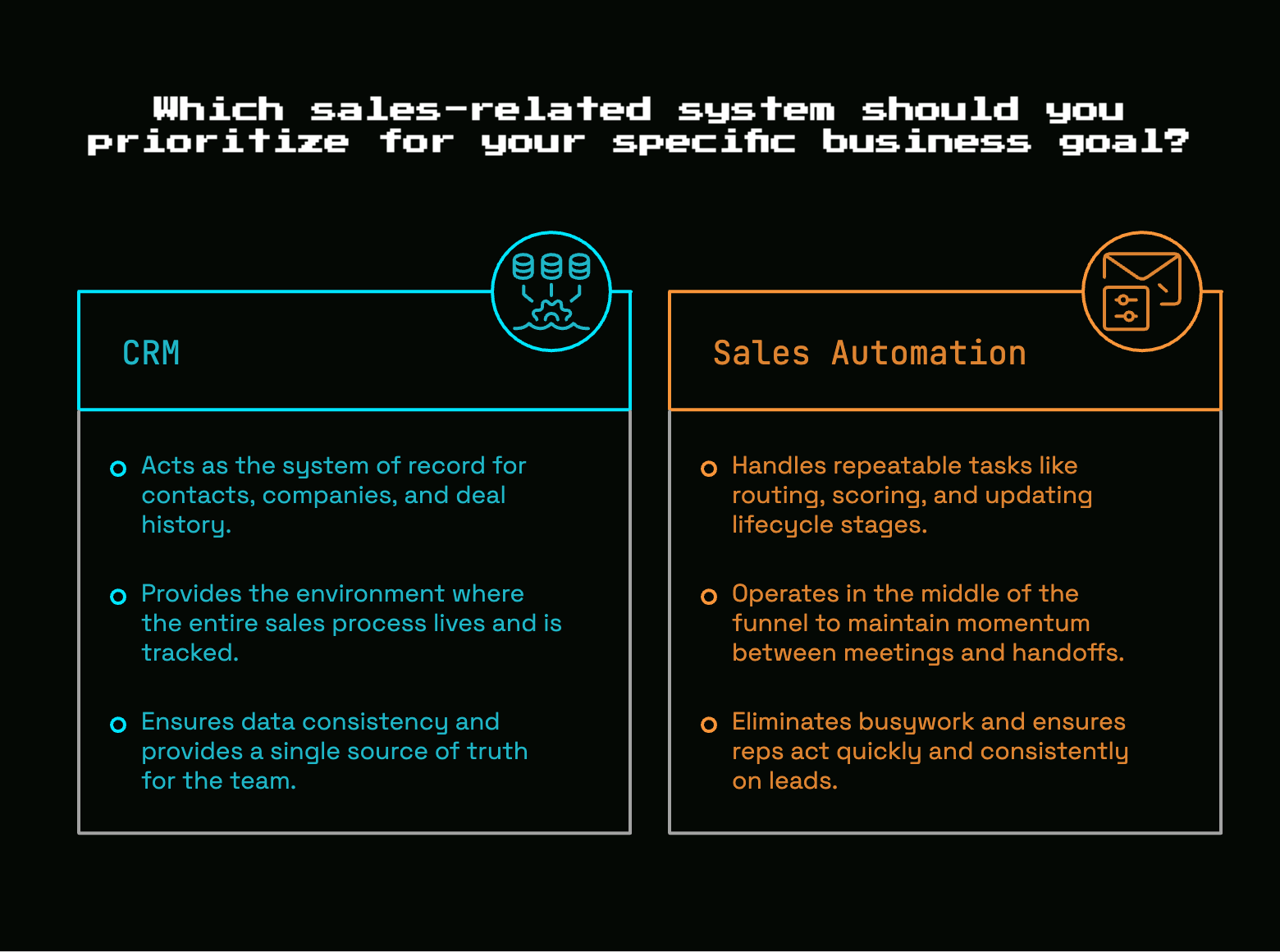
A CRM is your system of record. It stores contacts, companies, deals, owners, activity history, and pipeline stages. Think of it as the place your sales process lives, or at least the place it is supposed to live.
Marketing automation usually handles top-of-funnel campaigns. Email newsletters, nurture flows, webinar follow-up, lead magnets, ad audience sync, that kind of work. It is built to reach and warm up potential buyers at scale.
Sales automation picks up when a lead needs to move through an active pipeline with less manual effort. It routes, scores, assigns, reminds, sequences, and updates. It is less about broad campaigns and more about helping your team act quickly and consistently.
The overlap is real. A single tool may do pieces of all three. But the job is different. CRM stores. Marketing automation broadcasts and nurtures. Sales automation moves deals along with less busywork.
What sales automation should do for you at $1M, $5M ARR
At $1M, $5M ARR, the goal is not elegance. The goal is fewer dropped balls.
This is the stage where founder-led sales starts to strain, or your first rep spends half the week cleaning up records, chasing no-shows, and figuring out what happened in past conversations. Handoffs are messy. Lead sources are inconsistent. Some follow-up lives in the CRM, some in inboxes, some in somebody's head.
Good sales automation should buy back time and create consistency without adding a huge maintenance burden. It should help you respond faster, keep pipeline cleaner, and make it easier for a new rep to operate without needing tribal knowledge from day one.
And honestly, it should make your sales process less fragile. If one busy Tuesday afternoon can cause a dozen good leads to sit untouched, you do not have a people problem yet. You have a systems problem.
Fix this first: automate the work that repeats every week
Here’s the thing: the first move in sales automation is almost never buying another tool. The first move is identifying the work that repeats every week, affects revenue, and does not need a human to think hard about it.
That is the stuff to automate first.
Not the edge cases. Not the enterprise approval maze. Not the six-branch workflow you sketched on a whiteboard and never quite trusted. Start with the boring, repeatable work that eats time and causes delays when it gets skipped.
A good rule is to ignore anything flashy until you have removed the obvious friction. If your team still manually assigns inbound leads, logs meetings by hand, and forgets post-demo follow-up, that is where the payoff is. A simple automation that saves 20 minutes a day is better than a clever one nobody uses.
The 3-part test: frequent, important, low-judgment
The fastest way to spot a strong automation candidate is to run every task through a three-part test.
Frequent means it happens constantly. Daily or weekly, not once a quarter. Lead assignment, follow-up reminders, record creation, meeting logging, and trial nudges qualify. A complex custom approval flow for one giant prospect probably does not.
Important means it affects speed, conversion, or pipeline quality. If missing the task causes a lead to cool off, a deal to stall, or data to go missing, it matters. If the task is mildly annoying but has no real downstream effect, move it down the list.
Low-judgment means a clear rule can handle it. If X happens, do Y. If a form is submitted, assign owner by segment. If a proposal sits untouched for seven days, create a follow-up task. If a rep no-shows a data entry step, sync it automatically instead of relying on discipline.
When a task checks all three boxes, automate it early. That is your best return.
What not to automate first
A lot of teams get into trouble by automating the messiest part of the process first.
Do not start with workflows that still change every week. If your messaging is in flux, your qualification rules are fuzzy, or your handoff from product to sales is still being argued about, automation will lock confusion into the system. Faster confusion is still confusion.
Avoid complex enterprise workflows early. Avoid anything that depends on data you do not trust. Avoid automating a sequence of actions if nobody agrees on what the right sequence is in the first place.
And avoid building around exceptions. Small teams often spend too much energy handling rare situations perfectly while common situations stay sloppy. Fix the common path first. The rest can wait.
Start with a quick audit of your current sales process
Before touching software, map what already happens.
Where do leads come from? What happens after a form fill, a trial signup, a booked demo, a completed demo, a proposal, a closed-lost deal? Who owns each step? Where does somebody have to manually copy information from one place to another? Where do deals slow down for no good reason?
This does not need a giant process document. A simple end-to-end map is enough. The point is to see the system clearly before you start adding triggers and rules.
Most teams already know the pain points in a vague way. The audit turns vague frustration into specific workflow candidates.
Track where time actually goes for one week
For one week, track sales time in plain categories. Not forever. Just long enough to get honest data.
You will usually find the same drains: updating the CRM after calls, scheduling meetings, chasing no-replies, assigning leads, building lists by hand, rewriting the same follow-up email, or digging through Slack to remember who owns an account.
That quick audit is revealing because memory lies. The job feels like selling, but a surprising chunk of the week often disappears into admin and coordination. Friday at 4:40 p.m. in a coffee shop booth, cleaning up notes from three calls and two no-shows, is not a rare scene. It is the system showing you where automation belongs.
Mark the handoffs where deals tend to slip
The most useful automations often sit at handoff points.
Inbound lead assignment is one. Demo follow-up is another. Trial-to-sales handoff is a big one for product-led SaaS. Expansion signals inside existing accounts matter too, especially if customer success and sales ownership is blurry. Closed-lost recycling also deserves attention, because good opportunities often disappear simply because nobody set a reminder to revisit them.
Any moment where one person, team, or system is supposed to pass context to another is a place where deals leak. Automation helps because it enforces the handoff every time, even on busy days.
Clean up your data before you automate anything important
This part is boring. It is also where a lot of avoidable pain gets prevented.
If your lifecycle stages are messy, source tags are inconsistent, owners are missing, or duplicate records are everywhere, your workflows will misfire. Leads get assigned wrong. Tasks go nowhere. Alerts fire for the wrong person. Reports stop being useful. Then the team stops trusting the system.
You do not need perfect data. You need trustworthy data in the handful of fields that your workflows depend on.
The minimum data fields you need to trust
For a small SaaS team, keep the must-have list short.
You need a reliable company name, usable contact info, a clearly assigned owner, a source field, a stage field, last activity, and next step. If your process depends on ICP fit, add one or two simple fields like company size, segment, or primary use case.
That is enough to support a lot of automation. It is also enough to surface obvious issues quickly. If next step is blank on half the open deals, that tells you something. If owner is missing on inbound leads, routing is not actually working.
The trick is to protect fields that drive action, not every field in the CRM. Requiring fifteen fields on every record usually makes data quality worse, not better.
Common data problems that break automation
Duplicates are the classic problem. One person fills out two forms, signs up for a trial with a work email, then books a demo with another variation of the same domain, and suddenly your CRM thinks this is three different opportunities.
Missing owners cause automations to fail silently. Free-text stage names create chaos because one rep writes “Demo Done,” another writes “Post Demo,” and another forgets to update anything at all. Inconsistent source tags make routing and reporting unreliable. Old contacts stay attached to live accounts. Forms dump junk into the CRM because validation was never tightened up.
The catch is that none of this looks dramatic at first. It just makes your workflows flaky. And flaky automation gets ignored fast.
Simple ways to improve data without a giant cleanup project
Do not start with a full CRM renovation. Start with the records tied to active pipeline and fresh inbound leads.
Standardize dropdown fields for stage, source, segment, and owner-related logic. Make only a few fields required, and only at the point where the field becomes necessary. Use form validation to catch obvious junk before it enters the system. Set clear ownership rules so every record has a home.
Most importantly, fix forward. Clean old records as needed, but make sure new records enter cleanly from now on. That gives you compounding returns without turning the next month into a data cleanup exercise.
Automate lead capture and routing before you touch anything flashy
If inbound demand exists at all, this is one of the best places to start.
Lead capture and routing automation makes sure a new lead lands in the right place quickly, with enough context to act. That sounds simple, but the impact is real. Faster routing means faster response. Faster response usually means more meetings and fewer forgotten opportunities.
For a first rep, this also removes a lot of ambiguity. Instead of constantly asking who owns what, the system handles the basic sorting.
Route inbound leads by clear rules
Routing logic should be simple enough to explain in one minute.
Assign by territory if geography matters. Assign by segment if SMB and mid-market follow different motions. Assign by company size, product line, or existing account ownership if those are your real dividing lines. If none of that applies, round-robin can work just fine.
What matters most is speed and consistency. A clear rule that handles 90 percent of inbound leads is far better than a complicated routing system that breaks on edge cases. Build for the normal path first.
Send instant internal alerts with useful context
Alerts should tell somebody what happened and what to do next.
A good internal notification includes who the lead is, company, source, what form or page triggered the lead, owner, and expected next action. If somebody requested a demo from the pricing page after starting a trial, that context matters. If somebody downloaded a generic checklist three weeks ago, that is a different situation.
Useful alerts shorten reaction time. Bad alerts just create noise.
Set SLAs for first response
Response-time discipline is much easier when the system reinforces it.
If an inbound lead sits untouched past your SLA, create a reminder. If it sits longer, escalate or reassign. If speed-to-lead matters for a segment, make that visible and enforceable inside the workflow.
This is one of those fixes that feels almost too basic, but it pays off fast. Plenty of pipeline problems start as response problems.
Automate follow-up so warm leads don’t die in your inbox
Warm leads usually do not disappear because of one dramatic mistake. They fade because follow-up slips by a day, then another day, then it feels awkward to restart the conversation.
That is why follow-up automation matters so much in SaaS sales. It protects momentum.
The goal is not robotic outreach. The goal is structure: timing, reminders, task creation, and a repeatable skeleton for messages you already send again and again.
Build follow-up sequences for the moments you repeat most
Start with the small set of moments that happen all the time: inbound demo request, post-demo recap, no-show follow-up, trial nudges, and closed-lost check-ins.
Those sequences do not need to be long. In fact, shorter is usually better early on because you can maintain them. A strong post-demo sequence might only be a recap, a reminder tied to the agreed next step, and a final check-in.
The best part is consistency. Nobody has to remember what usually happens after each stage. The system starts the right cadence automatically.
Keep personalization where it matters
Automation should handle structure and timing. Your rep should still handle the human parts.
That means customizing the specific problem discussed on the call, the use case that mattered, the stakeholder concern, or the rollout detail that came up in discovery. Timing can be automated. A canned speech should not be.
Think of it like mise en place in a kitchen. The ingredients are ready, the tools are out, the steps are easier. But the meal still needs actual cooking. Good sales automation works the same way.
Use task automation for non-email follow-up too
Not all follow-up belongs in email.
Create tasks for calls, LinkedIn touches, proposal nudges, renewal prep, expansion check-ins, and internal coordination. If a deal reaches proposal stage, generate a reminder to confirm stakeholder alignment. If a trial account goes inactive after a strong first week, create a task for outreach. If a renewal is 60 days out, prompt an account review.
This matters because real sales motion happens across channels. If automation only supports email, half the process still depends on memory.
Let your CRM update itself wherever possible
Admin automation is one of the least controversial wins in this whole category.
If your team spends too much time creating records, updating fields, logging meetings, and adding tasks by hand, you are paying a tax on every deal. It may not look dramatic in any one moment, but it adds up fast.
A trustworthy CRM should capture activity as a byproduct of doing the work, not as a second job after the work.
Auto-create records from forms, meetings, and product signups
When somebody fills out a form, books a meeting, or starts a product signup that should feed sales, relevant records should appear automatically. Contacts, companies, deals, and tasks should not wait for manual entry unless there is a very good reason.
This reduces delay and data loss at the same time. It also helps a first rep start the day with actual pipeline objects to work rather than a loose collection of emails and calendar events.
Sync activity data so reps stop double-logging
Email sync, calendar sync, call logging, and meeting capture are basic but powerful. When these work well, your CRM timeline becomes something you can trust.
That trust matters more than people admit. If your team has to choose between selling and updating the CRM, updating loses. Then reports get weaker, handoffs get harder, and management starts asking for manual status updates because the system looks incomplete.
Sync solves a lot of that. Not perfectly, but enough to remove the worst duplication.
Create stage-based tasks and next-step reminders
Pipeline stages should trigger the next action automatically whenever possible.
When a demo is completed, create a follow-up task and set a due date. When a deal moves to proposal, create a stakeholder check-in reminder. When a trial reaches a key milestone, prompt outreach. If a deal sits in one stage beyond your normal range, trigger an alert or stale-deal task.
This keeps the pipeline moving without relying on somebody to remember the obvious next step every single time.
Use automation to qualify and prioritize leads, not just collect them
A lot of sales automation stops at collection. Form fill captured, record created, owner assigned, done.
But the next level is better prioritization. Not every lead deserves the same speed, attention, or motion. Some accounts are a strong fit. Some users show unusually strong intent. Some are both, which is where things get interesting.
Automation helps by surfacing that signal early.
Start with simple scoring, not a mystery formula
Lead scoring becomes useless when it turns into a black box.
Start with a simple model you can explain out loud. Role matters. Company size matters. Product usage may matter. Urgency signals matter. Source can matter. Give points for good-fit traits and strong-intent behaviors, then bucket the result into something actionable.
Simple beats fancy here. A score that your team trusts and uses is worth far more than a complex model nobody can interpret.
Use product signals if you have a free trial or PLG motion
If your product generates trial activity, use it.
Inviting teammates, repeated usage, feature adoption, hitting a usage limit, or returning several days in a row can all signal buying momentum. Those events are especially useful because they reflect real behavior, not just form intent.
A user who signed up casually but activated a meaningful workflow inside the product deserves a different kind of outreach than somebody who requested a demo and never showed up. Product signals help you time that outreach better.
Separate high-fit from high-intent
A perfect-fit company and a highly active random user are not the same thing.
High-fit means the account matches your ideal customer profile. Right size, right use case, right kind of team, likely budget. High-intent means the behavior suggests urgency or interest. Repeated product usage, fast follow-up, multiple stakeholders engaged, or a strong hand-raise.
Both deserve attention, but not necessarily the same playbook. Automation can tag and route them differently so your team responds with the right motion instead of treating every signal the same.
Build automations around the moments that move pipeline
The easiest way to think about workflow design is by sales moments, not tool features.
Instead of asking what your platform can automate, ask what happens right after the moments that matter. Form fill. Demo booked. Demo completed. Trial active. Proposal sent. Those are the points where momentum either builds or leaks away.
After form fill
After a form fill, the system should confirm receipt, assign an owner, enrich the record if possible, and create the first-touch task. If the form signals strong buying intent, the notification should reflect that.
That sequence does two things at once: it reassures the prospect and removes internal delay.
After demo booked
Once a demo is booked, send reminder emails, add meeting context into the CRM, and create any prep tasks that help the rep show up informed. If qualification questions were answered on the form, that context should be visible before the call starts.
This makes the meeting feel tighter and reduces the scrambling that often happens ten minutes before go time.
After demo completed
After the demo, trigger a recap template, a follow-up task, a stage update, and a next-step deadline. If the next step is missing after a certain amount of time, create a reminder to fill it in.
Post-demo is one of the highest-risk drop-off points in SaaS sales. Automating the basics keeps a good conversation from dissolving into “just circling back” a week later.
During trial or proof of concept
During a trial or proof of concept, use activity-based automations to spot momentum or risk. Send inactivity nudges. Flag important usage milestones. Prompt internal outreach when adoption expands or suddenly drops.
This is where product behavior becomes part of the sales system instead of a separate universe.
After proposal sent
After a proposal goes out, set a reminder cadence, prompt stakeholder follow-up, and alert the owner if the deal stalls beyond a defined number of days.
Proposal stage often creates false confidence. The document is out, but the deal is not moving on its own. Small automations help keep that stage active without making every follow-up feel improvised.
Pick the right sales automation tools without overbuying
Tool shopping is where a lot of sensible teams lose the plot.
The market makes everything sound urgent. AI assistants, revenue orchestration, forecasting layers, enrichment engines, engagement platforms, conversation intelligence, and about twelve other categories that all promise more pipeline. But early on, most value comes from a small core stack used well.
Choose tools based on what manual task they remove right now, not on what a vendor says your future sales org will someday need.
The core stack most early-stage SaaS teams actually need
For most SaaS teams in this range, the essentials are a CRM, scheduling, basic sequencing, form capture, and reporting. That is the backbone.
Your CRM stores the process. Scheduling removes calendar friction. Sequencing supports repeat follow-up. Form capture creates clean entry points. Reporting tells you whether any of this is helping.
Many teams can handle a surprising amount inside the tools already on hand. If your CRM includes workflow automation, email sequences, basic routing, and activity sync, squeeze that first before layering on another paid platform.
Nice-to-have tools you can wait on
Advanced AI assistants can wait. Heavy forecasting platforms can wait. Complex orchestration layers can wait. Dedicated tools for edge-case routing, elaborate enrichment, or multi-system signal stitching often make more sense later, once the underlying process is stable.
The catch is not just cost. It is maintenance. Every extra tool adds setup time, sync risk, ownership questions, and one more place where automation can break quietly.
Early-stage teams rarely suffer because a cutting-edge category is missing. They suffer because basics are inconsistent.
Questions to ask before adding any new tool
Before adding anything, answer a few blunt questions. What manual task does this remove? What trigger starts the workflow? Where does the source-of-truth data live? Who owns the workflow once it is live? How will you know it worked?
If those answers are vague, do not buy the tool yet.
Avoid the most common sales automation mistakes
Most automation problems are not technical problems. They are process problems wearing a technical disguise.
The software did exactly what it was told to do. The issue is usually that the underlying process was unclear, the messaging was weak, or nobody owned the workflow after launch.
Automating a process you haven’t simplified
If qualification means one thing to one rep and another thing to somebody else, automation will not fix that. If pipeline stages are vague, if handoffs are inconsistent, if nobody agrees on what happens after a no-show, the workflow just formalizes confusion.
Simplify first. Then automate.
Sending robotic outreach at scale
Automation can make good follow-up consistent. It can also turn average messaging into industrial-scale spam.
Once that happens, deliverability suffers, prospects tune out, and your brand starts sounding like a template farm. This is especially damaging in B2B SaaS, where category reputations travel fast and buyers can spot fake personalization in about three seconds.
Volume is not the win. Useful, timely, relevant outreach is the win.
Creating too many workflows nobody owns
Small teams often end up with a messy pile of automations built over months of urgency. Nobody remembers the trigger logic. A field changes and something breaks. An alert keeps firing in Slack long after the original process changed.
Name workflows clearly. Document the trigger and outcome. Assign an owner. Review them on a cadence. Hidden automation is risky automation.
Measure whether your automation is actually helping
The point is not to collect automations like trophies. The point is better sales execution.
That means faster response, cleaner pipeline, more follow-up completion, less admin work, and more selling time. If a workflow exists but does not improve any of that, it is decoration.
Metrics to watch first
Start with a short list. Speed to lead. First response time. Meeting booked rate. No-show rate. Follow-up completion. CRM completeness. Stage conversion. Rep time saved.
Those metrics connect directly to behavior and pipeline movement. They are also practical enough for a lean team to track without building an analytics program around them.
Compare before-and-after, not vanity numbers
Take a baseline before launching a workflow. Even a simple baseline helps. How long does it take to respond to inbound leads now? How often does post-demo follow-up happen within 24 hours? How many open deals are missing a next step?
Then compare after launch. This is much more useful than admiring activity volume or workflow counts.
Review automations on a regular cadence
A lightweight monthly or quarterly review is enough for most teams.
Check for errors, adoption, edge cases, stale logic, and whether the workflow still matches your current motion. A routing rule that made sense six months ago may be wrong now. A sequence that worked when you sold to one segment may sound off now that your market shifted.
Automations should evolve with the process. If not, they become fossils.
A practical rollout plan for your first 30 days
You do not need a transformation project. You need one month of focused cleanup and one useful workflow that actually sticks.
Week 1: audit tasks and find one bottleneck
Map the process, track time, and identify one repeated pain point that affects response speed, follow-up consistency, or pipeline cleanliness.
Pick just one. Inbound routing is a good candidate. So is post-demo follow-up. So is automatic task creation after calls.
Week 2: clean the minimum viable data
Fix the fields your chosen workflow depends on. Standardize source, stage, owner, and any routing or qualification fields involved. Clean active records first.
This is enough. You do not need to rehabilitate every old contact in the database.
Week 3: launch one workflow with clear rules
Build one workflow with a simple trigger and a visible outcome. If a demo finishes, create follow-up task and set due date. If a lead comes in from the pricing page, assign owner and send alert.
Keep it easy to verify. If you cannot tell in ten seconds whether it fired correctly, it is too complicated for version one.
Week 4: measure, fix, and only then add the next one
Review what failed, what got ignored, and what actually improved. Fix edge cases. Tighten data inputs. Confirm adoption.
One working automation beats ten half-built ones. Every time.
What to fix first in common SaaS sales scenarios
The right first automation depends on your motion, but some patterns show up again and again.
If you’re still founder-led on sales
Start with inbound routing, meeting scheduling, and post-demo follow-up. Founder-led sales often runs on memory and inbox triage, which works until it really does not.
The best early fix is removing the steps most likely to get delayed when your day gets crowded.
If you just hired your first sales rep
Prioritize CRM hygiene, task automation, stage-based reminders, and a few core sequences. Your first rep should spend time selling, not reverse-engineering your process from scattered notes and old emails.
A clean system also makes coaching easier because the pipeline starts reflecting reality.
If you have a free trial or product-led funnel
Automate outreach based on product signals, trial nudges, lifecycle updates, and handoff rules between self-serve and sales-assisted paths.
This matters because the product already contains buying intent. If those signals stay trapped in product analytics and never reach sales, you are missing some of the best timing data you have.
If you’re bootstrapped and need to keep the stack lean
Use the tools you already pay for before adding more. Most lean teams can automate routing, tasks, follow-up, forms, and basic scoring inside a CRM plus a couple of connected tools.
That keeps costs lower, but more importantly, it keeps maintenance sane. Cheap complexity is still expensive if nobody can manage it.
Your simplest next move
Pick one sales task that happens every week, matters to pipeline, and follows a clear rule. Then automate just that.
If your leads get assigned faster, your follow-up gets more consistent, or your CRM gets cleaner, you will feel the difference almost immediately. Start small, make it work, and let that win earn the next one.


Discussion